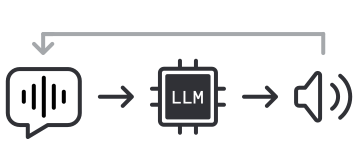
1. Conversational Voice AI in 2026
LLMs are good conversationalists.
If you've spent much time in free-form dialog with ChatGPT or Claude, you have an intuitive sense that talking to an LLM feels quite natural and is broadly useful.
LLMs are also good at turning unstructured information into structured data.[1]
Voice AI agents leverage these two LLM capabilities – conversation, and extracting structure from unstructured data – to create a new kind of user experience.
[1] Here we mean this broadly, rather than in the narrow sense of the "structured output" feature of some LLMs.
Voice AI is being deployed today in a wide range of business contexts. For example:
- collecting patient data prior to healthcare appointments,
- following up on inbound sales leads,
- handling an increasing variety of call center tasks,
- job interviews and user research interviews,
- coordinating scheduling and logistics between companies, and
- answering the phone for nearly every kind of small business.
On the consumer side, conversational voice (and video) AI is also starting to make its way into social applications and games. And developers are sharing personal voice AI projects and experiments every day on GitHub and social media.
2. Voice AI is not just "voice"
Those of us who work on Voice AI have been thinking about:
- multi-modal agents,
- multi-model orchestration,
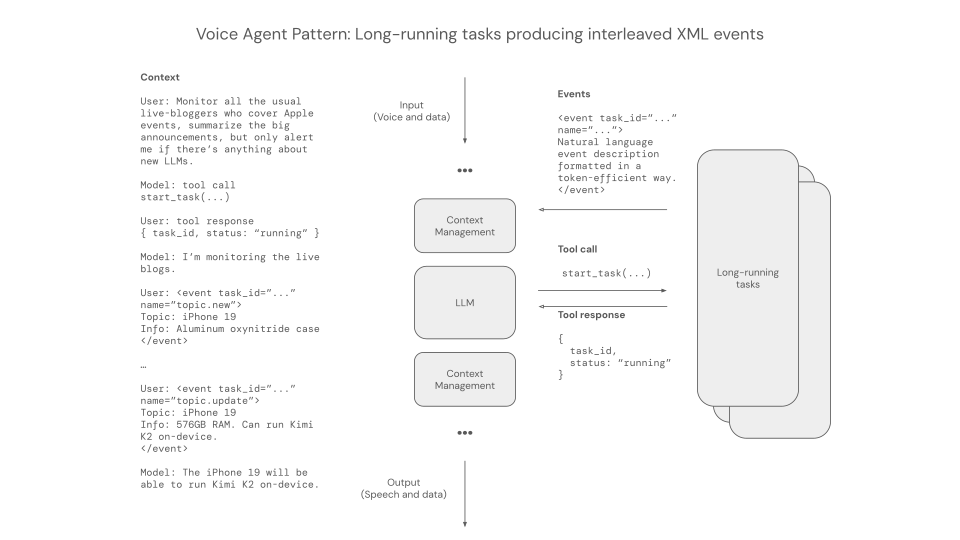
- asynchronous tool calling,
- context compaction,
- hybrid local/cloud inference,
- progressive "skills" loading,
- agent memory,
- continual learning,
- sandboxes, and
- dynamically generated user interfaces
since … 2023!
It turns out that to build a good voice agent we needed to figure out a lot of the things that are core to building good agents in general.
And we had to do it while optimizing for ultra low-latency responsiveness. (Humans want voice agents to respond to them as fast as other humans do, in conversation.)
Today, we're seeing voice AI expand beyond the enterprise use cases that were the first large-scale adopters of agents.
We're building new abstractions for "thinking fast and slow" styles of agent orchestration. Teams building real-time video models are making the same kind of progress we saw voice models making in 2023 and 2024. More and more people are using voice input every day to interact with their desktops, coding agents, and co-pilots of all kinds.
In this guide, we'll mostly focus on the core enabling technology of "voice agents." But if you're interested in new agent architectures, new user interfaces, and multi-agent orchestrations, the global voice AI developer community is doing lots of innovative work.
3. About this guide
This guide is a snapshot of the voice AI state of the art.[2]
Building production-ready voice agents is complicated. Many elements are non-trivial to implement from scratch. If you build voice AI apps, you'll likely rely on a framework for many of the things discussed in this document. But we think it's useful to understand how the pieces fit together, whether you are building them all from scratch or not.
This guide was inspired by Sean DuBois' open-source book WebRTC For the Curious. That book has helped numerous developers get up to speed with WebRTC since it was first released four years ago.[3]
The voice AI code examples in this document use the Pipecat open source framework.[4] Pipecat is the most widely used voice AI framework, with teams at AWS and NVIDIA, all of the large AI labs, Fortune 500 companies like ServiceNow, and thousands of startups, scale-ups, and individual developers leveraging and contributing to the codebase.
We've tried to give general advice in this document, rather than recommend commercial products and services. Where we highlight specific vendors, we do so because they are used by a large percentage of voice AI developers.
3.1. Keeping up with model releases
Keeping up with the fast-changing AI model landscape is a big challenge. There is a constant stream of model releases that are relevant to voice agents.
Benchmarks are an important way to track model progress and figure out whether to spend time fully evaluating a specific model. Unfortunately, most of the widely publicized model benchmarks aren't useful for voice AI. Voice agents are always multi-turn, so benchmarks that do not test long, multi-turn performance won't tell you how a model performs in real conversations. Latency is very important for voice agents, and most benchmarks don't report TTFT (time to first token) or similar metrics.
Here are the benchmarks we use to track model releases and first-party API performance:
[2] We originally wrote this guide for the AI Engineering Summit in February 2025. This update was published in June 2026.
[3] webrtcforthecurious.com — WebRTC is relevant to voice AI, as we'll discuss later in the WebSockets and WebRTC section.
[4] Pipecat has integrations for more than 100 AI models and services, along with state of-the-art implementations of things like turn detection and interruption handling. You can write code with Pipecat that uses WebSockets, WebRTC, HTTP, and telephony to communicate with users. Pipecat includes transport implementations for a variety of infrastructure platforms including Twilio, Telnyx, LiveKit, Daily, and others. There are client-side Pipecat SDKs for JavaScript, React, iOS, Android, and C++.
4. The basic conversational AI loop
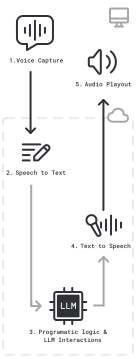
The basic "job to be done" of a voice AI agent is to listen to what a human says, respond in some useful way, then repeat that sequence.
Production voice agents today almost all have a very similar architecture. A voice agent program runs in the cloud and orchestrates the speech-to-speech loop. The agent program uses multiple AI models, some running locally to the agent, some accessed via APIs. The agent program also uses LLM function calling or structured outputs to integrate with back-end systems.
- Speech is captured by a microphone on a user's device, encoded, and sent over the network to a voice agent program running in the cloud.
- Input speech is transcribed, to create text input for the LLM.
- Text is assembled into a context — a prompt — and inference is performed by an LLM. Inference output will often be filtered or transformed by the agent program logic.[5]
- Output text is sent to a text-to-speech model to create audio output.
- Audio output is sent back to the user.
You'll notice that the voice agent program is running in the cloud, and the text-to-speech, LLM, and speech-to-text processing are happening in the cloud. Over the long term, we expect to see more AI workloads running on-device. Today, though, production voice AI is very cloud-centric, for two reasons:
- Voice AI agents need to use the best available AI models to reliably execute complex workflows at low latency. End-user devices do not yet have enough AI compute horsepower to run the best STT, LLM, and TTS models at acceptable latency.
- The majority of commercial voice AI agents today are communicating with users via phone calls. For a phone call, there is no end-user device — at least, not one that you can run any code on!
Let's dive[6] into this agent orchestration world and answer questions like:
- What LLMs work best for voice AI agents?
- How do you manage the conversation context during a long-running session?
- How do you connect voice agents to existing back-end systems?[7]
- How do you know if your voice agents are performing well?
[5] For example, to detect common LLM errors and safety issues.
[6] Let's delve — ed.
[7] For example, CRMs, proprietary knowledge bases, and call center systems.
5. Core technologies and best practices
5.1. Latency
Building voice agents is similar in most ways to other kinds of AI engineering. If you have experience building text-based, multi-turn AI agents, much of your experience from that domain will be useful in voice, as well.
The big difference is latency.
Humans expect fast responses in normal conversation. A response time of 500ms is typical. Long pauses feel unnatural.
It's worth learning how to accurately measure latency — from the end user's perspective — if you are building voice AI agents.
You will often see AI platforms quote latencies that are not true "voice-to-voice" measurements. This is generally not malicious. From the provider side of things, the easy way to measure latency is to measure inference time. So that's how providers get used to thinking about latency. However, this server-side view does not account for audio processing, phrase endpointing delay, network transport, and operating system overhead.
Measuring voice-to-voice latency is easy to do manually.
Simply record the conversation, load the recording into an audio editor, look at the audio waveform, and measure from the end of the user's speech to the beginning of the LLM's speech.
If you build conversational voice applications for production use, it's worthwhile to occasionally sanity check your latency numbers this way. Bonus points for adding simulated network packet loss and jitter when you do these tests!
Measuring true voice-to-voice latency is challenging to do programmatically. Some of the latency happens deep inside the operating system. So most observability tools just measure time-to-first-(audio)-byte. This is a reasonable proxy for total voice-to-voice latency, but again please note that things you don't measure — like phrase endpointing variation and network round-trip time — can become problematic if you have no way to track them.
If you are building conversational AI applications, 1,500 ms voice-to-voice latency is an important target to aim for. Here's a breakdown of a voice-to-voice round trip from a user's microphone, to the cloud, and back. These numbers are fairly typical, and the total is about 1,200 ms. So 1,500 ms is challenging — if your telephony provider adds a few hundred milliseconds, you're over budget — but is possible to achieve with today's best AI models and an efficient framework like Pipecat.
| Stage | Time (ms) |
|---|---|
| macOS mic input | 40 |
| opus encoding | 21 |
| network stacks and transit | 10 |
| packet handling | 2 |
| jitter buffer | 40 |
| opus decoding | 1 |
| transcription and endpointing | 300 |
| llm ttfb | 650 |
| sentence aggregation | 20 |
| tts ttfb | 120 |
| opus encoding | 21 |
| packet handling | 2 |
| network stacks and transit | 10 |
| jitter buffer | 40 |
| opus decoding | 1 |
| macOS speaker output | 15 |
| Total ms | 1293 |
A voice-to-voice conversation round trip — latency breakdown.
We have demonstrated Pipecat agents that achieve voice-to-voice latency as low as 500 ms, by hosting all models within the same GPU-enabled cluster, and optimizing all models for latency instead of throughput.
Because latency is so important for voice use cases, latency will come up often throughout this guide.

5.2. LLMs for voice use cases
The release of GPT-4 in March 2023 kicked off the current era of voice AI. GPT-4 was the first LLM that could both sustain a flexible, multi-turn conversation and be prompted precisely enough to perform useful work.
Today, the most widely used models for voice agents are GPT-4.1, GPT-5.1, and Gemini 2.5 Flash.
These models combine:
- Low latency.
- Good instruction following.[8]
- Reliable function calling.[9]
- Low rates of hallucination and other kinds of inappropriate responses.
- Dependable personality and tone.
- Relatively low cost.
[8] How easy is it to prompt the model to do specific things?
[9] Voice AI agents rely heavily on function calling.
Recently, several model families are challenging the GPT and Gemini model families on the Pareto frontier of intelligence and latency.
You'll notice that GPT-4.1 and Gemini 2.5 Flash are both relatively old models. Newer models in both families are "reasoning" models. They are much slower to produce content tokens. Gemini 3 models are particularly slow, so even though they perform well on intelligence benchmarks we generally can't use them for voice agents.
Our thinking has evolved since the earliest days of building voice agents, though. We spent a lot of time, in 2024, convincing people that agents could respond "as quickly as humans." We now have a lot of empirical evidence from deploying real-world voice agents for a wide range of use cases. People are happy talking to agents that respond within 1,500 ms.
It is critical, though, not to have latency spikes, or to let latency creep up above 1,500 ms as you add features like tool calling to your agents. And because latency is so important for voice use cases, latency will come up often throughout this guide.
| Model | Median TTFT (ms) | P95 TTFT (ms) |
|---|---|---|
| GPT-4.1 | 536 | 1771 |
| Gemini 2.5 Flash | 597 | 1137 |
| Claude 4.5 Haiku | 637 | 1615 |
| GPT-5.1 | 739 | 1492 |
| Nemotron 3 Ultra (self-hosted) | 541 | 712 |
A rough rule of thumb: LLM time-to-first-token of 600 ms or less is fast enough for most voice AI use cases.
Note that P95 times matter, too, and recently all providers have had worse P95 times from their public APIs than we would like to see.
It is possible, at scale, to have lower latency by purchasing committed inference compute from AWS, GCP, and Azure. Similarly, self-hosting open weights models (for example, NVIDIA Nemotron) becomes an interesting option if you have enough consistent usage to justify the baseline cost of always-on GPU instances.
5.2.1 Cost comparison
Speaking of cost, per-token pricing has been dropping regularly and rapidly. And OpenAI, Google, and Anthropic all now support input token caching, which further reduces the cost for multi-turn conversations. (All voice agent conversations are multi-turn.)
| Model | 3-minute conversation | 10-minute conversation | 30-minute conversation |
|---|---|---|---|
| Gemini 2.5 Flash | $0.002 | $0.006 | $0.024 |
| Claude 4.5 Haiku | $0.006 | $0.019 | $0.075 |
| GPT-5.1 | $0.008 | $0.025 | $0.100 |
| GPT-4.1 | $0.019 | $0.069 | $0.318 |
Approximate LLM cost for conversations of various lengths, in English. This assumes a 2,000 token system prompt.
See below for a discussion of estimating voice agent total costs (not just LLM costs).
5.2.2 Open source / open weights
Voice AI use cases are demanding enough that it generally makes sense to use the best available model that can operate at real-time latency.
This has limited the models that are used for voice AI to proprietary models.
However, open weights models are beginning to match closed models on important benchmarks. This is exciting, because open models expand what we can do with voice agents. Open models allow us to customize the inference stack (for example, prioritizing latency over throughput), fine-tune on our own data, and run the models on our own infrastructure.
Several promising open models have been released recently that we are beginning to use in voice agents and task subagents: the NVIDIA Nemotron 3 model family, Kimi 2.6, Gemma 4, and GLM 5.
See below for benchmark charts and Pareto frontier diagrams.
[11] If you plan to fine-tune an LLM for your use case, an open weights model is a very good starting point. More on fine-tuning below.
5.2.3 What about speech-to-speech models?
A speech-to-speech LLM can be prompted with audio, rather than text, and can produce audio output directly. This eliminates the speech-to-text and text-to-speech parts of the voice agent orchestration loop.
The potential benefits of speech-to-speech models are:
- Lower latency.
- Improved ability to understand the nuances of human conversation.
- More natural voice output.
OpenAI, Google, and AWS all offer speech-to-speech models served via their APIs. NVIDIA and several other research labs have shipped speech-to-speech demos and research artifacts.
Speech-to-speech models do not follow instructions or call tools as reliably as text-mode LLMs. They are also slower, more expensive, less configurable, and harder to integrate into real-world agent systems.
On the other hand, today's best speech-to-speech models do sound very natural. OpenAI's gpt-realtime model really does sound like a preview of the voice AI future.
Here's how speech-to-speech models stack up against text-mode LLMs today:
- Lower latency is possible in theory, for speech-to-speech models, but audio uses more tokens than text. Larger token contexts are slower for the LLM to process. In practice, today, both the OpenAI and Google speech-to-speech models are slower than a well-tuned cascaded (multi-model) voice agent.
- Better understanding does seem to be a real benefit of these models. This is particularly apparent for Gemini 2.5 Flash and Gemini 3 Flash audio input.
- Better natural voice output is clearly perceptible, today. In tests, most users rate output from the best speech-to-speech models as more natural than output from standalone text-to-speech models.
- The APIs for speech-to-speech models are significantly less flexible than they need to be for production voice agent engineering. Enterprise voice agents need to do a lot of context manipulation and summarization. This is possible with the OpenAI Real-time API, but because the API maintains its own internal version of the conversation context, the bookkeeping is tricky. Sophisticated context manipulation is not possible at all with the Gemini Live API, which is best regarded as an alpha release that is not ready for production.
- Speech-to-speech APIs don't offer fast or reliable transcription. If you need accurate transcription of user input for compliance, downstream evals, or for use in an application UI, the transcription from the speech-to-speech APIs may not be good enough.
- For use cases where input is mixed-language speech, the speech-to-speech models perform far, far better than a multi-model pipeline. Language learning applications, for example, greatly benefit from this strength of speech-to-speech models.
It's also worth noting that speech-to-speech APIs are still relatively expensive. We built a calculator for the OpenAI Real-time API that shows how cost scales with session length, factoring in OpenAI's very nice automatic token caching feature. An agent built with the OpenAI Real-time API is 3 to 5 times more expensive than an agent built with GPT-4.1.
We expect to see continued progress on the speech-to-speech front. But how quickly production voice AI applications will move from the multi-model approach to using speech-to-speech APIs is still an open question.
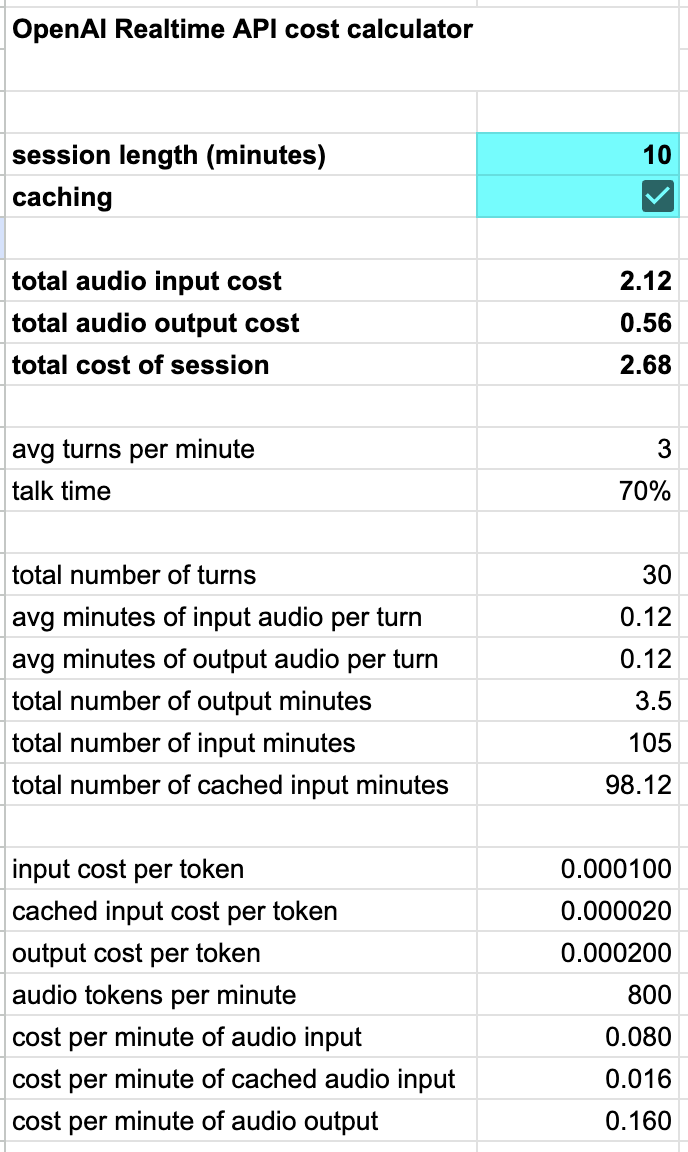
OpenAI Realtime API cost calculator
5.3. LLM benchmarks
5.3.1 The intelligence/latency Pareto frontier
Intelligence, latency, and cost are all important factors when choosing which LLMs to use for our agents.
Because latency is particularly important for voice agents, we're often forced into a trade-off between using a model that is not as "smart" as we'd like, but has a fast TTFT.
This is particularly true because, for the past two years, the foundation labs have focused on reasoning models, which output "thinking" tokens before they produce actual content.
The user-visible response latency of a reasoning model isn't the time to first token. It's the time to first non-thinking token.
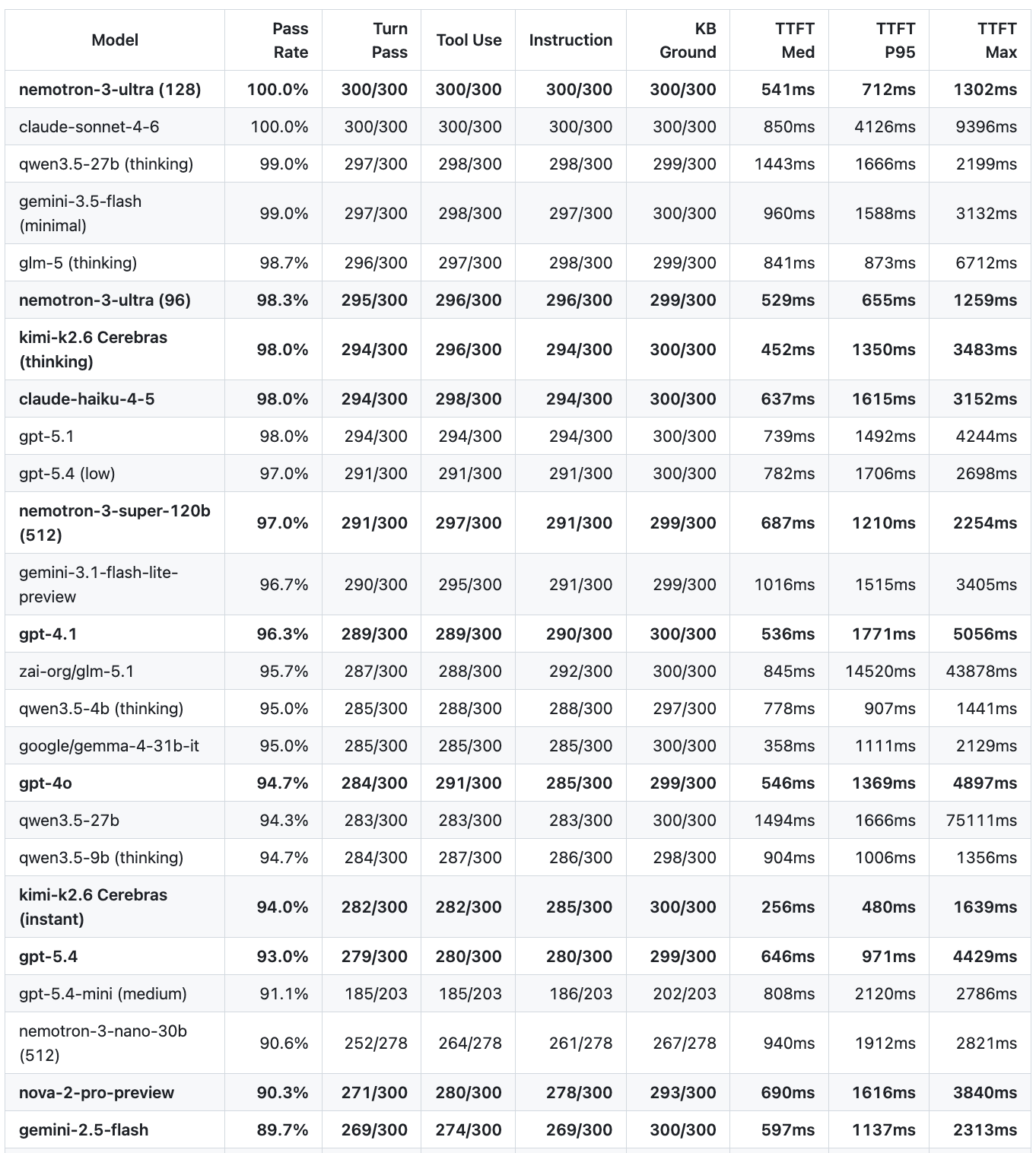
We maintain a 30-turn conversation benchmark that tests LLM performance in a challenging, real-world voice agent scenario.
We've tracked two recent trends with great interest.
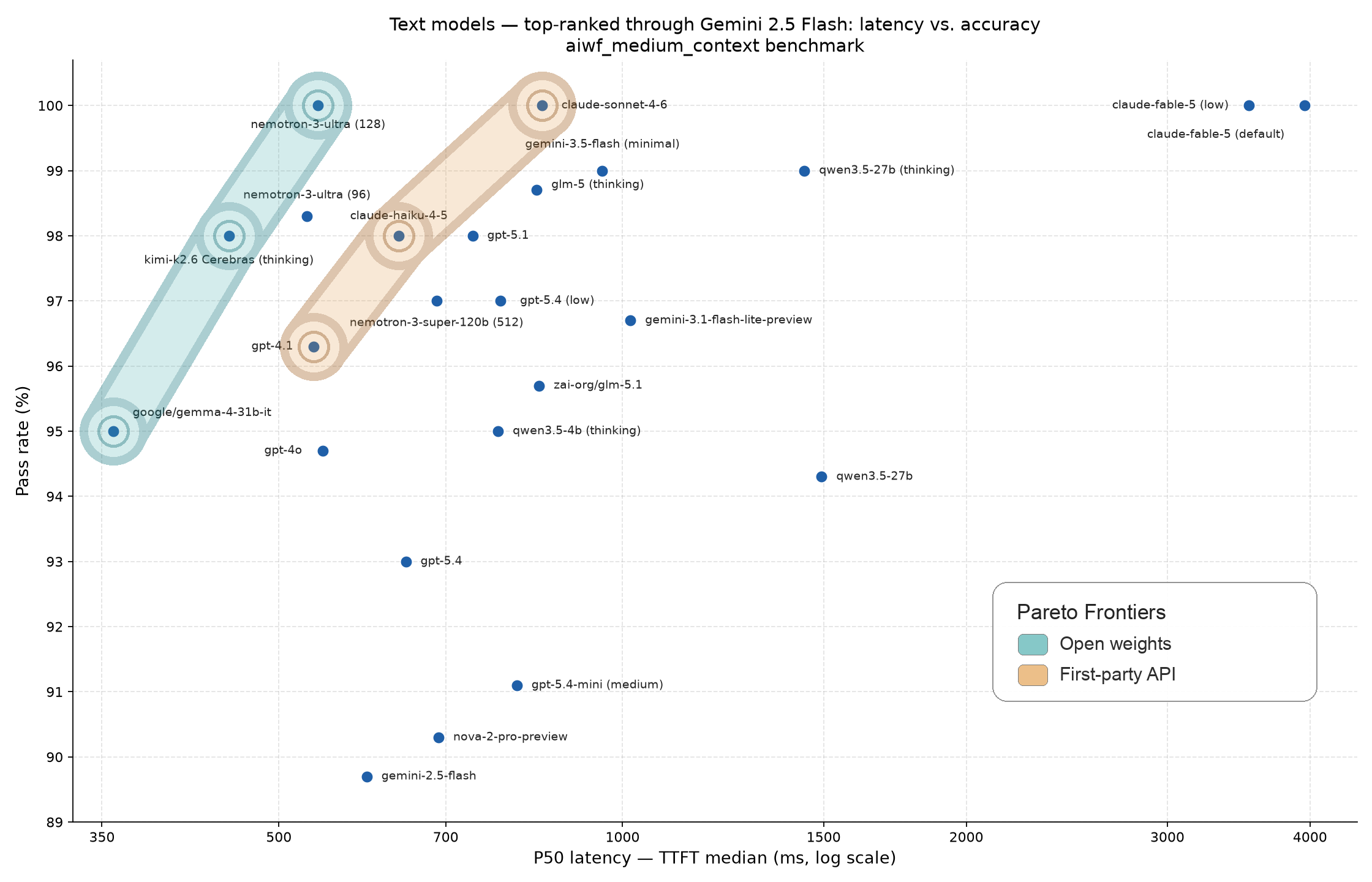
Starting in late 2025, new models started to saturate this benchmark. However, all these new models are too slow for voice use cases. We need a TTFT (first non-thinking token) faster than 700ms to use a model for realtime voice conversation. Still, saturating this hard benchmark is a big milestone.
This year, we've seen new performance jumps in open models. Nemotron 3 Ultra is the first open model that scores 100% on this benchmark. It's also the first model — open or proprietary — that both saturates the benchmark and delivers a TTFT below 700ms.
There are now two Pareto frontiers on the benchmark chart. Nemotron 3 Ultra (self-hosted), Kimi 2.6 (hosted on Cerebras) and Gemma 4 31b (hosted on Lilac) define an open model Pareto frontier. GPT-4.1, Claude Haiku 4.5, and Claude Sonnet 5.6 form a separate proprietary model/first-party API frontier.
Open models outperform the closed models for latency-sensitive use cases.
The caveat here is that you have to self-host or commit significant inference volume to a new platform like Cerebras or Lilac. On the other hand, using an open model opens up other opportunities for fine-tuning and customization.
5.4. Speech-to-text
Speech-to-text is the "input" stage for voice AI. Speech-to-text is also commonly referred to as transcription or ASR (automatic speech recognition).
For voice AI use cases, we need very low transcription latency and very low word error rate.
Today there are a number of transcription models that deliver excellent accuracy at very low latency.
5.4.1 The STT Pareto frontier
We maintain speech-to-text benchmarks that test models in configurations and on data from real-world voice agents:
https://github.com/pipecat-ai/stt-benchmark/
On the chart, you can see a Pareto frontier cluster with models from NVIDIA, Deepgram, Soniox, Cartesia, AssemblyAI, and Speechmatics all performing extremely well.
Deepgram is the long-time leader in real-time transcription. Soniox offers low-latency transcription models across a wide range of languages. Speechmatics is a UK company that trains speech models for real-time, broadcast, and on-device applications. AssemblyAI offers innovative features such as multi-turn context carry-over. Cartesia's text-to-speech models have won significant market share in the voice generation market and they are now shipping competitive speech-to-text models as well. NVIDIA's model is completely open source.
All of these models are available through APIs or as Docker containers that customers can run on their own infrastructure. Deepgram's models are also available through AWS SageMaker.
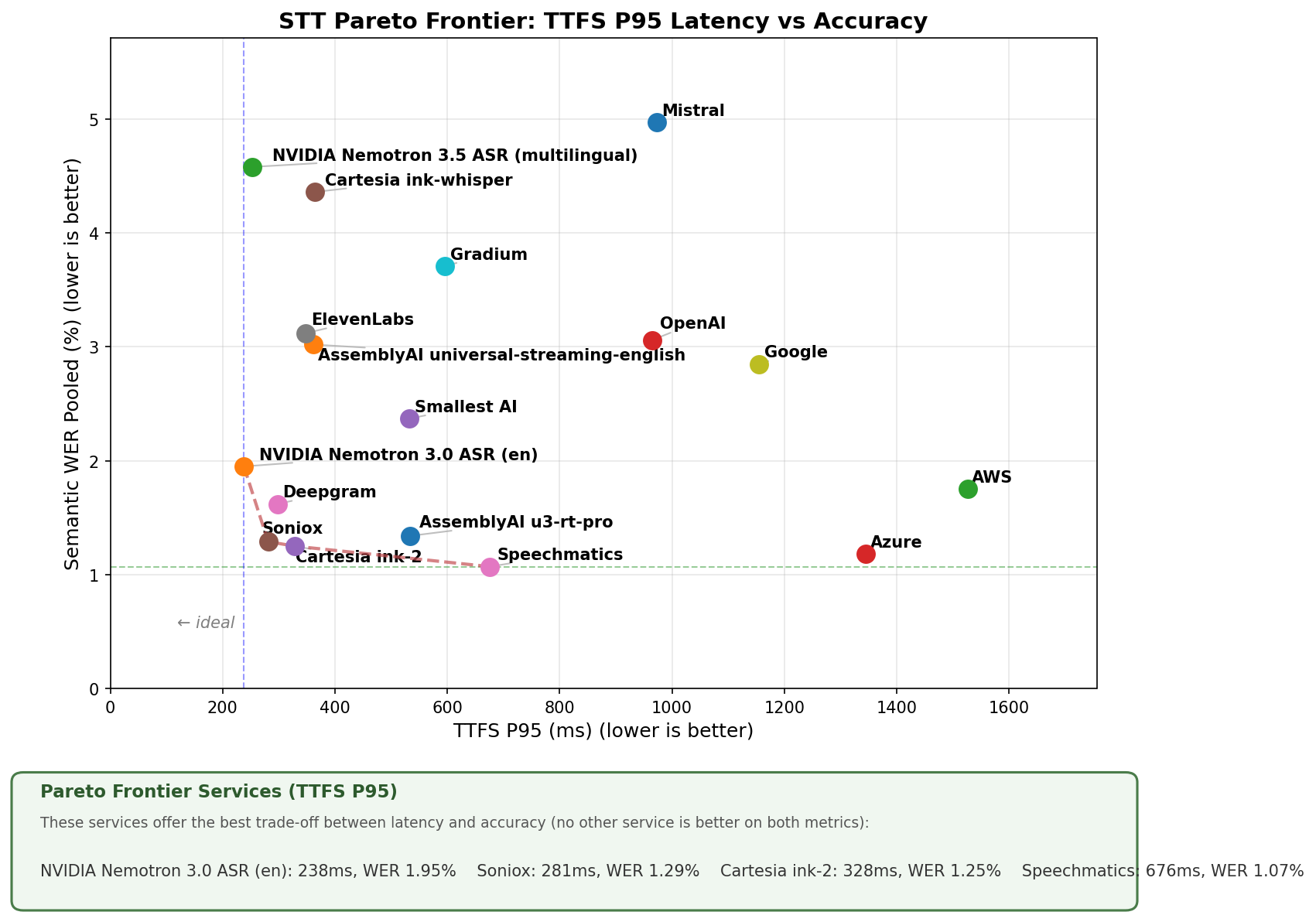
Pareto Frontier Services (TTFS P95)
Most people start out using speech-to-text models via an API. Managing a scalable GPU cluster is a significant ongoing devops job to take on, so moving from an API to hosting models on your own infrastructure is not something you should do without a good reason. But there definitely are good reasons for self-hosting, which include:
- Keeping audio and transcription data private. Your company policies may prohibit sending user data outside your own infrastructure. You may have legal requirements to process data only in a specific geographic region.
- Reducing latency. API providers may not have inference servers in regions where you have users. This is a significant issue for voice agents. From Europe, round-trip network time to the US is ~250 ms; from India, ~350 ms.
Several providers also offer fine-tuning services, which can help lower error rates if your use case includes relatively unusual vocabularies, speech styles, or accents.
Fine-tuning on your own data is also a good reason to explore using the NVIDIA open models.
5.4.2 Prompting can help the LLM.
A large percentage of transcription errors result from the very small amount of context that the transcription model has available in a realtime stream.
Today's LLMs are smart enough to work around transcription errors. When the LLM is performing inference it has access to the full conversation context. So you can tell the LLM that the input is a transcription of user speech, and that it should reason accordingly.
You are a helpful, concise, and reliable voice assistant. Your primary goal is to understand the user's spoken requests, even if the speech-to-text transcription contains errors. Your responses will be converted to speech using a text-to-speech system. Therefore, your output must be plain, unformatted text.

When you receive a transcribed user request:
1. Silently correct for likely transcription errors. Focus on the intended meaning, not the literal text. If a word sounds like another word in the given context, infer and correct. For example, if the transcription says "buy milk two tomorrow" interpret this as "buy milk tomorrow".
2. Provide short, direct answers unless the user explicitly asks for a more detailed response. For example, if the user says "what time is it?" you should respond with "It is 2:38 AM". If the user asks "Tell me a joke", you should provide a short joke.
3. Always prioritize clarity and accuracy. Respond in plain text, without any formatting, bullet points, or extra conversational filler.
4. If you are asked a question that is time dependent, use the current date, which is February 3, 2025, to provide the most up to date information.
5. If you do not understand the user request, respond with "I'm sorry, I didn't understand that."

Your output will be directly converted to speech, so your response should be natural-sounding and appropriate for a spoken conversation.
Example prompt language for a voice AI agent.
5.5. Text-to-speech
Text-to-speech is the output stage of the voice-to-voice processing loop.
Voice AI developers choose a voice model/service based on:
- How natural the voices sound (overall quality)[16]
- Latency[17]
- Cost
- Language support
- Word-level timestamp support
- Ability to customize voices, accents, and pronunciations
[16] Pronunciation, intonation, pacing, stress, rhythm, emotional valence.
[17] Time to first audio byte.
Voice options expanded markedly in 2024 and 2025. New startups appeared on the scene. Best-in-class voice quality went way up. And every provider improved latency.
As is the case for speech-to-text, all of the big cloud providers have text-to-speech products.[18] But most voice AI developers are not using them, because models from startups are currently better.
[18] Azure AI Speech, Amazon Polly, and Google Cloud Text-to-Speech.
The labs that have the most traction for realtime conversational voice models are (in alphabetical order):
- Cartesia – Uses an innovative state-space model architecture.
- Deepgram – Prioritizes latency and low cost. Deepgram's transcription models were the original low-latency/high-accuracy ML models for voice AI.
- ElevenLabs – Emphasizes emotional and contextual realism.
- Gradium – A commercial spin-out of the non-profit French lab, Kyutai, which has produced some of the world's most innovative speech model work.
- Inworld – Roots in AI technology innovations for video games.
All four companies have strong models, experienced engineering teams, and stable and performant APIs. The Cartesia, Deepgram, and Gradium models can be deployed on your own infrastructure.
| Cost per minute (approx) | Median TTFA (ms) | P95 TTFA (ms) | |
|---|---|---|---|
| Cartesia Sonic 3.5 | $0.028 | 195 | 240 |
| Deepgram Aura-2 | $0.024 | 310 | 600 |
| ElevenLabs Turbo v2.5 | $0.050 | 330 | 670 |
| Gradium | $0.032 | 235 | 320 |
| Inworld TTS 1.5 Max | $0.009 | 337 | 560 |
Approximate cost per minute (at scale) and time-to-first-audio metrics – June 2025. Note that cost depends on committed volume and features used.
As with speech-to-text, there is wide variance in quality and support for non-English voice models. If you are building voice AI for non-English use cases, you will likely need to do more extensive testing — test more services and more voices to find a solution that you are happy with.
All voice models will mispronounce words some of the time, and will not necessarily know how to pronounce proper nouns or unusual words.
Some services offer the ability to steer pronunciation. This is helpful if you know in advance that your text output will include specific proper nouns. If your voice service does not support phonetic steering, you can prompt your LLM to output "sounds-like" spellings of specific words. For example, in-vidia instead of NVIDIA.
              Replace "NVIDIA" with "in vidia" and replace

              "GPU" with "gee pee you" in your responses.
Example prompt language to steer pronunciation via LLM text output
For conversational voice use cases, being able to track what text the user heard is important for maintaining accurate conversation context. This requires that a model generate word-level timestamp metadata in addition to the audio, and that the timestamp data be reconstructible backwards to the original input text. This is a relatively new capability for voice models. All of the models in the table above except ElevenLabs Flash support word-level timestamps.
{
  "type": "timestamps",
  "context_id": "test-01",
  "status_code": 206,
  "done": false,
  "word_timestamps": {
    "words": ["What's", "the", "capital", "of", "France?"],
    "start": [0.02, 0.3, 0.48, 0.6, 0.8],
    "end": [0.3, 0.36, 0.6, 0.8, 1]
  }
}
Word-level timestamps from the Cartesia API.
In addition, a really solid realtime streaming API is helpful. Conversational voice applications often trigger multiple audio inferences in parallel. Voice agent code needs to be able to interrupt in-progress inference and to correlate each inference request to one output stream. Streaming APIs from voice model providers are all relatively new and still evolving.
We expect voice model progress to continue in 2026.
5.6. Audio processing
A good voice AI platform or library will mostly hide the complexities of audio capture and processing. But if you build complex voice agents, at some point you'll bump up against bugs and corner cases in audio handling.[19] So it's worth taking a quick tour of the audio input pipeline.
[19] … this generalizes to all things in software, and perhaps most things in life.
5.6.1 Microphones and automatic gain control
Microphones today are extremely sophisticated hardware devices coupled to large amounts of low-level software. This is usually great — we get terrific audio from tiny microphones built into mobile devices, laptops, and Bluetooth earpieces.
But sometimes this low-level software doesn't do what we want. In particular, Bluetooth devices can add several hundred milliseconds of latency to voice input. This is largely outside of your control as a voice AI developer. But it's worth being aware that latency can vary widely depending on what operating system and input device a particular user has.

Most audio capture pipelines will apply some amount of automatic gain control to the input signal. Again, this is usually what you want, because this compensates for things like the user's distance from the microphone. You can often disable some automatic gain control, but on consumer-class devices you usually can't disable it completely.
5.6.2 Echo cancellation
If a user is holding a phone up to their ear, or wearing headphones, you don't need to worry about feedback between the local microphone and speaker. But if a user is talking on a speakerphone, or using a laptop without headphones, then good echo cancellation is extremely important.
Echo cancellation is very sensitive to latency, so echo cancellation has to run on the device (not in the cloud). Today, excellent echo cancellation is built into telephony stacks, web browsers, and WebRTC native mobile SDKs.[20]
So if you're using a voice AI, WebRTC, or telephony SDK, you should have echo cancellation that you can count on "just working" in almost all real-world scenarios. If you are rolling your own voice AI capture pipeline, you will need to figure out how to integrate echo cancellation logic. For example, if you are building a WebSocket-based React Native application, you won't have any echo cancellation by default.[21]
[20] Note that Firefox echo cancellation is not very good. We recommend that voice AI developers build with Chrome and Safari as primary platforms, and only test on Firefox as a secondary platform, time permitting.
[21] We recently helped someone debug their React Native app's audio issues. The root cause was that they didn't realize they needed to implement echo cancellation, since they were not using a voice AI or WebRTC SDK.
5.6.3 Noise suppression, speech, and music
Audio capture pipelines for telephony and WebRTC almost always default to "speech mode." Speech can be compressed much more than music, and noise reduction and echo cancellation algorithms are easier to implement for narrower band signals.
Many telephony platforms only support 8khz audio. This is noticeably low-quality by modern standards. If you are routing through a system with this limitation, there's nothing you can do about it. Your users may or may not notice the quality — most people have low expectations for phone call audio.
WebRTC supports very high-quality audio.[22] Default WebRTC settings are usually 48khz sample rate, single channel, 32 kbs Opus encoding, and a moderate noise suppression algorithm. These settings are optimized for speech. They work across a wide range of devices and environments and are generally the right choice for voice AI.
Music will not sound good with these settings!
If you need to send music over a WebRTC connection, you'll want to:
- Turn off echo cancellation (the user will need to wear headphones).
- Turn off noise suppression.
- Optionally, enable stereo.
- Increase the Opus encoding bitrate (64 kbs is a good target for mono, 96 kbs or 128 kbs for stereo).
[22] Some use cases for high-quality audio:
- A music lesson with an LLM teacher.
- Recording a podcast that includes background sound or music.
- Generating AI music interactively.
5.6.4 Encoding
Encoding is the general term for how audio data is formatted for sending over a network connection.[23]
[23] (Or for saving in a file.)
Common encodings for real-time communication include:
- Uncompressed audio in 16-bit PCM format.
- Opus — WebRTC and some telephony systems.
- G.711 — a standard telephony codec with wide support.
| Codec | Bitrate | Quality | Use Cases |
|---|---|---|---|
| 16-bit PCM | 384 kbps (Mono 24 kHz) | Very High (Near lossless) | Voice recording, embedded systems, environments where simple decoding is vital |
| Opus 32 kbps | 32 kbps | Good (Psychoacoustic compression optimized for speech) | Video calls, low-bandwidth streaming, podcasting |
| Opus 96 kbps | 96 kbps | Very Good to Excellent (Psychoacoustic compression) | Streaming, music, audio archiving |
| G.711 (8 kHz) | 64 kbps | Poor (Limited bandwidth, voice-centric) | Legacy VoIP systems, telephony, fax transmission, voice messaging |
Audio codecs used most often for voice AI
Opus is by far the best of these three options. Opus is built into web browsers, designed from the ground up to be a low-latency codec, and very efficient. It also performs well across a wide range of bitrates, and supports both speech and high-fidelity use cases.
16-bit PCM is "raw audio." You can send PCM audio frames directly to a software sound channel (assuming that the sample rate and data type are correctly specified). Note, however, that this uncompressed audio is not something you generally want to send over an Internet connection. 24khz PCM has a bitrate of 384 kbs. That's a large enough bitrate that many real-world connections from end-user devices will struggle to deliver the bytes in real time.
5.6.5 Server-side noise processing and speaker isolation
Speech-to-text and voice activity detection models can usually ignore general ambient noise – street sounds, dogs barking, loud fans close to a mic, keyboard clicks. So the traditional "noise suppression" algorithms that are critical for many human-to-human use cases are not as critical for voice AI.
But one kind of audio processing is particularly valuable for voice AI: primary speaker isolation. Primary speaker isolation suppresses background speech. This can significantly improve transcription accuracy.
Think of trying to talk to a voice agent from an environment like an airport. Your phone mic is likely to pick up a lot of background speech from gate announcements and people walking by. You don't want that background speech in the text transcript the LLM sees!
Or imagine the user who is in their living room with the TV or radio on in the background. Because humans are generally pretty good at filtering out low-volume background speech, people won't necessarily think to turn off their TV or radio before they call into a customer support line.
The best available speaker isolation model that you can use in your own voice AI pipeline is sold by Krisp. Licenses are targeted at enterprise users and are not inexpensive. But for commercial use cases at scale, the improvement in voice agent performance justifies the cost.
OpenAI includes noise reduction as a feature of their Realtime API.
  pipeline = Pipeline(
    [
      transport.input(),
      krisp_filter,
      vad_turn_detector,
      stt,
      context_aggregator.user(),
      llm,
      tts,
      transport.output(),
      context_aggregator.assistant(),
    ]
  )
Pipecat pipeline with a Krisp processing element
5.6.6 Voice activity detection
A voice activity detection stage is part of almost every voice AI pipeline. VAD classifies audio segments as "speech" and "not speech." We will talk in detail about VAD in the Turn detection section, below.
5.7. Network transport
5.7.1 WebSockets and WebRTC
Both WebSockets and WebRTC are used by AI services for audio streaming.
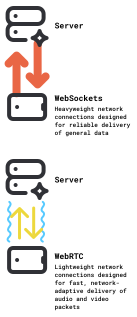
WebSockets are great for server-to-server use cases. They are also fine for use cases where latency is not a primary concern, and are a good fit for prototyping and general hacking.
WebSockets shouldn't be used in production for client-server, realtime media connections.
If you are building a browser or native mobile app, and achieving conversational latency matters to your application, you should use a WebRTC connection to send and receive audio from your app.
The major problems with WebSockets for real-time media delivery to and from end-user devices are:
- WebSockets are built on TCP, so audio streams will be subject to head-of-line blocking.
- The Opus audio codec used for WebRTC is tightly coupled to WebRTC's bandwidth estimation and packet pacing (congestion control) logic, making a WebRTC audio stream resilient to a wide range of real-world network behaviors that would cause a WebSocket connection to accumulate latency.
- The Opus audio codec has very good forward error correction, making the audio stream resilient to relatively high amounts of packet loss. (This only helps you if your network transport can drop late-arriving packets and doesn't do head of line blocking, though.)
- WebRTC audio is automatically timestamped, so both playout and interruption logic are trivial.
- WebRTC includes hooks for detailed performance and media quality statistics. A good WebRTC platform will give you detailed dashboards and analytics. This level of observability is somewhere between very hard and impossible to build for WebSockets.
- WebSocket reconnection logic is quite hard to implement robustly. You will have to build a ping/ack framework (or fully test and understand the framework that your WebSocket library provides). TCP timeouts and connection events behave differently on different platforms.
- Finally, good WebRTC implementations today come with very good echo cancellation, noise reduction, and automatic gain control.
You can use WebRTC in two ways.
- Routing through WebRTC servers in the cloud.
- Establishing a direct connection between a client device and a voice AI process.
Routing through cloud servers will perform better for many real-world use cases (see network routing, below). Cloud infrastructure also makes possible a number of features that direct connections can't support as easily or as scalably (multi-participant sessions, integration with telephony systems, recording).
But "serverless" WebRTC is a good fit for many voice AI use cases. Pipecat supports serverless WebRTC via the SmallWebRTCTransport class. And frameworks like Hugging Face's FastRTC are built entirely around this networking pattern.
5.7.2 HTTP
HTTP is still useful and important for voice AI, too! HTTP is the lingua franca for service interconnection on the Internet. REST APIs are HTTP. Webhooks are HTTP.
Text-oriented inference happens via HTTP, so voice AI pipelines usually call out to HTTP APIs for the LLM parts of the conversational loop.
Voice agents also use HTTP when integrating with external services and internal APIs. One useful technique is proxying LLM function calls to HTTP endpoints. This decouples voice AI agent code and devops from function implementations.
Multimodal AI applications will often want to implement both HTTP and WebRTC code paths. Imagine a chat app that supports both a text mode and a voice mode. Conversation state needs to be accessible via either connection path, which has ramifications for both client and server-side code (for example, how things like Kubernetes pods and Docker containers are architected.)
The two drawbacks to HTTP are latency and the difficulty of implementing long-lived, bidirectional connections.
- Setting up an encrypted HTTP connection requires multiple network round trips. It's reasonably hard to achieve media connection setup times much lower than 30ms, and realistic time-to-send-first-byte is closer to 100ms even for heavily optimized servers.
- Long-lived, bidirectional HTTP connections are difficult enough to manage that you're usually better off just using WebSockets.
- HTTP is a TCP-based protocol, so the same head-of-line blocking issues that impact WebSockets are an issue for HTTP.
- Sending raw binary data over HTTP is uncommon enough that most APIs opt to base64 encode binary data, which increases the bitrate of media streams.
Which brings us to QUIC …
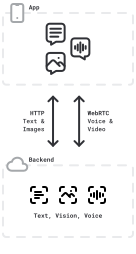
A voice AI agent using both HTTP and WebRTC for network communication.
5.7.3 QUIC and MoQ
QUIC is a new network protocol designed to be the transport layer for the latest version of HTTP (HTTP/3) — and to flexibly support other Internet-scale use cases, too.
QUIC is a UDP-based protocol, and addresses all of the above issues with HTTP. With QUIC you get faster connection times, bidirectional streams, and no head-of-line blocking. Google and Facebook have been steadily rolling out QUIC, so these days, some of your HTTP requests traverse the Internet as UDP, rather than TCP, packets. [24]
[24] This is a little bit 🤯 if you have been building stuff on the Internet for a long time. HTTP has always been a TCP-based protocol!
QUIC will be a big part of the future of media streaming on the Internet. Migration to QUIC-based protocols for realtime media streaming will take time, though. One blocker to building QUIC-based voice agents is that Safari support for the QUIC-based evolution of WebSockets, WebTransport, is very new.
The Media over QUIC IETF working group[25] aims to develop a "simple low-latency media delivery solution for ingest and distribution of media." As with all standards, hashing out how to support the widest possible array of important use cases with the simplest possible building blocks is not easy. People are excited about using QUIC for on-demand video streaming, large-scale video broadcast, live video streaming, low-latency sessions with large numbers of participants, and low-latency 1:1 sessions.
Realtime voice AI use cases are growing at just the right time to influence the development of the MoQ standard.
5.7.4 Network routing
Long-haul network connections are problematic for latency and real-time media reliability, no matter what the underlying network protocol is.
For real time media delivery, you want your servers to be as close to your users as possible.
For example, round trip packet time from a user in the UK to a server hosted by AWS us-west-1 in Northern California will typically be about 140 milliseconds. In comparison, RTT from that same user to AWS eu-west-2 would generally be 15 milliseconds or less.
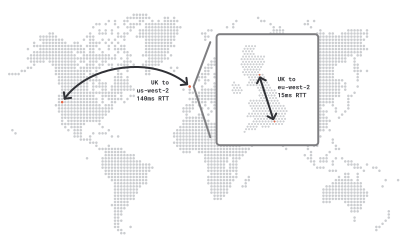
RTT from a user in the UK to AWS us-west-1 is ~100ms more than to AWS eu-west-2
That's a difference of more than 100 milliseconds — ten percent of your latency "budget" if your voice-to-voice latency target is 1,000 milliseconds.
Edge routing
You may not be able to deploy servers close to all of your users.
Achieving a 15ms RTT to users everywhere in the world requires deploying to at least 40 global data centers. That's a big devops job. And if you're running workloads that require GPUs, or relying on services that aren't globally deployed themselves, it might be impossible.
You can't cheat the speed of light.[26] But you can try to avoid route variability and congestion.
[26] Ancient network engineer wisdom – ed.
The key is to keep your public Internet routes as short as possible. Connect your users to an edge server close to them. From there, use private routes.
This edge routing reduces median packet RTT. The UK → Northern California route over a private backbone is likely to be about 100 milliseconds. 100 ms (the long-haul private route) + 15 ms (the first hop over the public Internet) = 115 ms. This private route median RTT is 25ms better than the public route median RTT.
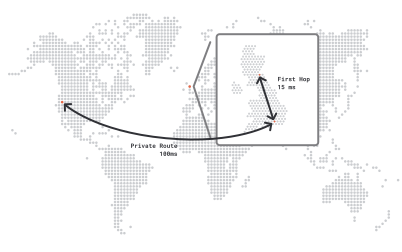
Edge route from the UK to AWS us-west-1. The first hop over the public network still has an RTT of 15ms. But the long route to Northern California over the private network has an RTT of 100ms. The total RTT of 115ms is 25ms faster than the public route from the UK to us-west-1. It's also significantly less variable (less packet loss and lower jitter).
Even more critical than median RTT improvement, though, is improved delivery reliability and lower jitter.[27] The P95 RTT of a private route will be significantly lower than the P95 of a public route.[28]
This means that realtime media connections over long-haul public routes will be measurably more laggy than connections that use private routes. Recall that we're trying to deliver each audio packet as quickly as possible, but that we have to play the audio packets in order. A single delayed packet forces us to expand our jitter buffer, holding onto other received packets until the delayed packet arrives. (Or, until we decide it's taken too long and we fill the gap with either fancy math or glitchy audio samples.)
[27] Jitter is the variability in how long it takes a packet to traverse the route.
[28] P95 is the 95th percentile measurement of a metric. P50 is the median measurement (the 50th percentile). Loosely speaking, we think of the P50 as the average case, and P95 as capturing a rough sense of "typical worst-case" connections.
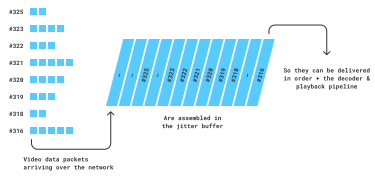
The jitter buffer — a larger jitter buffer translates directly to a larger perceived delay in audio and video. Keeping jitter buffers as small as possible contributes significantly to a good user experience.
A good WebRTC infrastructure provider will offer edge routing. They will be able to show you where they have server clusters and provide metrics that show their private route performance.
5.8. Turn detection
Turn detection means determining when the user is finished talking and expects the LLM to respond.
We (humans) do turn detection every time we talk to anyone else. [29]
[29] And we don't always get it right! Especially when we don't have visual cues to help us, or when there is a delay in the audio transport.
The single most common complaint about voice agents built "from scratch" (not using a framework like Pipecat) is that agents interrupt too often. But this is largely a solved problem. Voice agents that use today's best approaches to turn detection respond quickly, with interruption accuracy very similar to real humans.
In the academic literature, various aspects of turn detection are referred to as phrase detection, speech segmentation, and endpointing. (The fact that there is academic literature about this is a clue that it's a non-trivial problem.)
You can skip straight to State of the art turn detection if you just want to read a best practices overview. In the next few sections, we'll walk through the various building blocks for turn detection.
5.8.1 Voice activity detection
One common way to do turn detection for voice AI agents is to assume that a long pause means the user has finished speaking.
Voice AI agent pipelines identify pauses using a small, specialized voice activity detection model. A VAD model has been trained to classify audio segments as speech or non-speech. (This is much more robust than trying to identify pauses based only on volume level.)
You can run VAD on either the client-side of a voice AI connection, or on the server. If you need to do significant audio processing on the client anyway, you'll probably need to run VAD on the client to facilitate that. For example, maybe you are identifying wake words on an embedded device, and only sending audio over the network if you detect a wake word at the beginning of a phrase. Hey, Siri …
Generally, though, it's a bit simpler to just run VAD as part of the voice AI agent processing loop. And if your users are connecting via telephone, you don't have a client where you can run VAD, so you have to do it on the server.
The VAD model used most often for voice AI is Silero VAD. This open source model runs efficiently on CPU, supports multiple languages, works well for both 8khz and 16khz audio, and is available as wasm packages for use in web browsers. Running Silero on a realtime, mono audio stream normally takes less than 1/8th of a typical virtual machine CPU core.
A turn detection algorithm will have a few configuration parameters:
- Length of pause required for end of turn.
- Length of speech segment required to trigger a start speaking event.
- The confidence level for classifying each audio segment as speech.
- Minimum volume for speech segments.
Here are Pipecat's names and default values for the four VAD configuration parameters, if you are using VAD by itself for turn detection. (But these days you shouldn't be using VAD by itself. See State of the art turn detection below.)
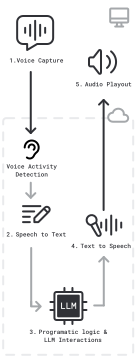
A voice activity detection processing step, here configured to run just prior to speech-to-text
  VAD_STOP_SECS = 0.8
  VAD_START_SECS = 0.2
  VAD_CONFIDENCE = 0.7
  VAD_MIN_VOLUME = 0.6
Tuning these parameters can improve turn detection behavior for specific use cases.
5.8.2 Push-to-talk
The obvious problem with basing turn detection on pauses in speech is that sometimes people pause but aren't finished talking.
Individual speaking styles vary. People pause more in some kinds of conversations than in others.
Setting a long pause interval creates stilted conversations — a very bad user experience. But with a short pause interval, the voice agent will frequently interrupt the user — also a bad user experience.
The most common alternative to pause-based turn detection is push-to-talk. Push-to-talk means requiring that the user push or hold a button when they start speaking, and push the button again or release it when they are finished speaking. (Think about how old-school walkie-talkies work.)
Turn detection is unambiguous with push-to-talk. Dictation programs and coding agent voice integrations often use push-to-talk. The downside is that the user experience of push-to-talk is quite different from a natural conversation. Also, push-to-talk isn't possible for telephone voice AI agents.
5.8.3 Endpoint markers
You can also use specific words as end-of-turn markers. (Think of truckers talking on CB radios saying "over.")
The easiest way to identify specific endpoint markers is to run a regular expression match against each transcription fragment. But you can also use a small language model to detect endpoint words or phrases.
Voice AI apps that use explicit endpoint markers are unusual. Users have to learn to talk to these apps. But this approach can work very well for specialized use cases.
For example, we saw a nice demo last year of a writing assistant that someone had built for themselves as a side project. They used a variety of command phrases to indicate turn endpoints and to switch between modes.
5.8.4 Context-aware turn detection (semantic VAD and smart turn)
When humans do turn detection, they use a variety of cues:
- Identification of filler words like "um" as being likely to indicate continued speech.
- Grammatical structure.
- Knowledge of patterns, such as telephone numbers having a specific number of letters.
- Intonation and pronunciation patterns like drawing out the final word before a pause.
Deep learning models are very good at identifying patterns. Small, specialized classification models can be trained on language, intonation, and pronunciation patterns.
There are now several good turn detection models available, and the leading STT model providers are all integrating turn detection into their STT APIs.
Pipecat Smart Turn is a completely open source, native audio, turn detection model that supports 23 languages.
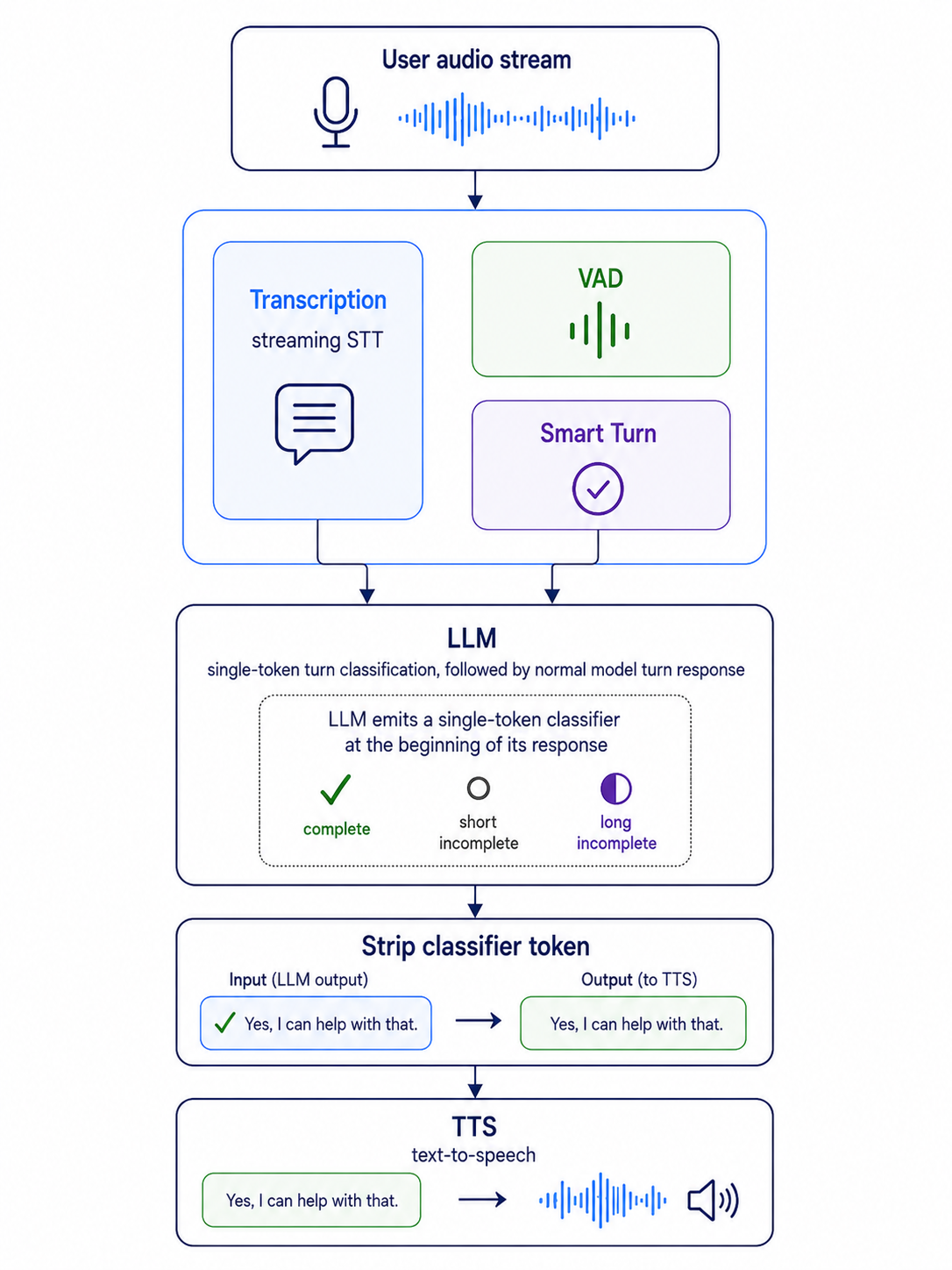
The Smart Turn model runs in parallel with transcription, gated by VAD set to a very short silence interval. This design provides a number of useful characteristics:
- The model operates directly on the user's speech audio, so it takes into account both language-level patterns and audio-level patterns like intonation, speech pacing, and pronunciation.
- Because Smart Turn doesn't operate on text, it doesn't have to wait for transcription to complete. This keeps latency as low as possible.
- The model is small, optimized to deliver a classification (complete turn or incomplete turn) in ~30ms on a typical cloud vCPU.
All of this, taken together, means that we're making turn decisions in ~250ms from the time a user pauses while speaking.
Having rock solid 250ms turn classification helps us design, debug, and monitor our agent behavior. ML models are "black boxes" and are hard to debug, in general. But our pipeline is not a black box. We can see the operation of every component.
All of the training data, training code, and evaluation/benchmarking code for Pipecat Smart Turn is freely available on GitHub and HuggingFace. The model is licensed under the BSD Open Source license. Many teams have contributed data to improve the model. If you'd like to contribute and participate in the development of Smart Turn, please submit PRs or join the Pipecat Discord.
5.8.5 State of the art turn detection: VAD, Smart Turn, and LLM single-token tagging
The best turn detection today combines three layers of processing:
- Voice activity detection, with a short (200ms) trigger.
- A native audio turn detection model that's small, fast, and runs on CPU. This model captures audio nuances like inflection and filler sounds that don't get transcribed.
- A prompt mixin for the conversation LLM that makes a configurable, context-aware turn completion decision.
None of these are new. We've been using VAD for a long time. We trained the first version of the Pipecat Smart Turn native audio model in December 2024. And we've been experimenting with prompt-based large model turn detection (sometimes called "selective refusal") for more than a year.
Now, in 2026, the Smart Turn model and the SOTA LLMs we're using in voice agents have both gotten so good that using them together feels like we've finally "solved" turn detection.
The insight here is that we can combine the audio turn detection model's fast "filtering" of audio speech patterns, with the LLM's access to full conversation context and understanding of text conversation patterns.
Using single-token tagging is the key to making this work in production. Single-token tagging means asking the LLM to always output a single turn-detection classifier character at the beginning of the response. We use that character to decide whether the user turn is complete (and filter it out so it isn't part of the LLM output for the text-to-speech service and other downstream pipeline components).
For the tags, you can use any strings that map to single tokens. Here are the tokens the Pipecat FilterIncompleteUserTurnStrategies service uses.
- ✓ means the agent should respond normally (immediately)
- ○ is a "short incomplete" - the agent should wait 5 seconds
- ◐ is a "long incomplete" - the agent should wait 10 seconds
The LLM has the full conversation context when it's making the turn detection decision. So the LLM can do things like generate a ○ tag (short incomplete) when a user pauses in the middle of a phone number, but a ✓ tag when the user pauses at the end of a phone number. This works very well, and feels like magic the first time it happens, if you're used to purely VAD-based turn detection. Note that you will often need to add specific examples to the prompt mixin to tune this kind of behavior. (Phone numbers have different formats in different countries!) Here are the complete Pipecat docs.
Here's the beginning of the FilterIncompleteUserTurnStrategies service's default prompt mixin. The full mixin is 480 words, heavily tested with GPT, Claude, and Gemini models. You can tweak this for your use case. You can also configure the short and long waits. And, if you want to develop this strategy further, you can customize the decision framework to use the signals from VAD, Smart Turn, and the LLM in different ways, or add additional signals such as computer vision that processes video of the user.
# System prompt instructions for turn completion that can be appended to any base prompt
USER_TURN_COMPLETION_INSTRUCTIONS = """
CRITICAL INSTRUCTION - MANDATORY RESPONSE FORMAT:
Every single response MUST begin with a turn completion indicator. This is not optional.

TURN COMPLETION DECISION FRAMEWORK:
Ask yourself: "Has the user provided enough information for me to give a meaningful, substantive response?"

Mark as COMPLETE (✓) when:
- The user has answered your question with actual content
- The user has made a complete request or statement
- The user has provided all necessary information for you to respond meaningfully
- The conversation can naturally progress to your substantive response

Mark as INCOMPLETE SHORT (○) when the user will likely continue soon:
- The user was clearly cut off mid-sentence or mid-word
- The user is in the middle of a thought that got interrupted
- Brief technical interruption (they'll resume in a few seconds)

Mark as INCOMPLETE LONG (◐) when the user needs more time:
- The user explicitly asks for time: "let me think", "give me a minute", "hold on"
- The user is clearly pondering or deliberating: "hmm", "well...", "that's a good question"
- The user acknowledged but hasn't answered yet: "That's interesting..."
- The response feels like a preamble before the actual answer

RESPOND in one of these three formats:
1. If COMPLETE: `✓` followed by a space and your full substantive response
2. If INCOMPLETE SHORT: ONLY the character `○` (user will continue in a few seconds)
3. If INCOMPLETE LONG: ONLY the character `◐` (user needs more time to think)

KEY INSIGHT: Grammatically complete ≠ conversationally complete
- "That's a really good question." is grammatically complete but conversationally incomplete (use ◐)
- "I'd go to Japan because I love" is mid-sentence (use ○)

EXAMPLES:

You ask: "Where would you travel?"
User: "I'd go to Japan because I love"
→ `○`
(Cut off mid-sentence - they'll continue in seconds)

# ... continues
5.9. Interruption handling
Interruption handling means allowing the user to interrupt the voice AI agent. Interruptions are a normal part of conversation, so handling interruptions gracefully is important.
To implement interruption handling, you need every part of your pipeline to be cancellable. You also need to be able to stop audio playout on the client very quickly.
Generally, the framework you're building with will take care of stopping all processing when an interruption is triggered. But if you're directly using an API that sends you raw audio frames faster than realtime, you'll have to manually stop playout and flush audio buffers.
5.9.1 Avoiding spurious interruptions
Several sources of unintended interruptions are worth noting.
- Transient noises classified as speech. Good VAD models do an excellent job separating speech from "noise." But certain kinds of short, sharp, initial audio will have moderate speech confidence attached to them when they appear at the beginning of an utterance. Coughing and keyboard clicks both fall into this category. You can adjust the VAD start segment length and confidence level to try to minimize this source of interruptions. The trade-off is that lengthening the start segment length and raising the confidence threshold will create problems for very short phrases that you do want to detect as complete utterances.[31]
- Echo cancellation failures. Echo cancellation algorithms aren't perfect. A transition from silence to speech playout is particularly challenging. If you've done a lot of voice agent testing, you've probably heard your bot interrupt itself right when it starts talking. The culprit is echo cancellation allowing a little bit of the initial speech audio to feed back into your microphone. The minimum VAD start segment length helps to avoid this problem. So does applying exponential smoothing[32] to the audio volume level to avoid sharp volume transitions.
- Background speech. The VAD model will not distinguish between user speech and background speech. If the background speech is louder than your volume threshold, background speech will trigger an interruption. A speaker isolation audio processing step can reduce spurious interruptions caused by background speech. See the discussion in the Server-side noise processing and speaker isolation section, above.
5.9.2 Maintaining accurate context after an interruption
Because LLMs generate output faster than realtime, when an interruption occurs you will often have LLM output queued up to send to the user.
Usually, you want the conversation context to match what the user actually heard (rather than what your pipeline generated faster than realtime).
You are probably also saving the conversation context as text.[33]
So you need a way to figure out what text the user actually heard!
The best speech-to-text services can report word-level timestamp data. Use these word-level timestamps to buffer and assemble assistant message text that matches the audio heard by the user. See the discussion of word-level timestamps in the Text-to-speech section, above. Pipecat handles this automatically.
[31] Pipecat's standard pipeline configuration combines VAD and transcription events to try to avoid both spurious interruptions and missed utterances.
[33] The standard context structure is the user / assistant message list format developed by OpenAI.
5.10. Managing conversation context
LLMs are stateless. This means that for a multi-turn conversation, you need to feed all of the previous user and agent messages — and other configuration elements — back into the LLM each time you generate a new response.
Turn 1:
  User: What's the capital of France?
  LLM: The capital of France is Paris.

Turn 2:
  User: What's the capital of France?
  LLM: The capital of France is Paris.
  User: Is the Eiffel Tower there?
  LLM: Yes, the Eiffel Tower is in Paris.

Turn 3:
  User: What's the capital of France?
  LLM: The capital of France is Paris.
  User: Is the Eiffel Tower there?
  LLM: Yes, the Eiffel Tower is in Paris.
  User: How tall is it?
  LLM: The Eiffel Tower is about 330 meters tall.
Sending the entire conversation history to an LLM every turn.
For each inference operation — each conversation turn — you can send the LLM:
- System instructions
- Conversation messages
- Tools (functions) for the LLM to use
- Configuration parameters (for example, temperature)
5.10.1 Differences between LLM APIs
This general design is the same for all the major LLMs today.
But there are differences between the various providers' APIs. OpenAI, Google, and Anthropic all have different message formats, differences in the structure of tools/functions definitions, and differences in how system instructions are specified.
There are third-party API gateways and software libraries that translate API calls into OpenAI's format. This is valuable, because being able to switch between different LLMs is useful. But these services can't always abstract the differences away properly. New features, and features unique to each API, aren't always supported. (And sometimes there are bugs in the translation layer.)
To abstract or not to abstract remains a question, in these relatively early days of AI engineering.[34]
Pipecat, for example, translates messages to and from OpenAI format for both context messages and tool definitions. But whether and how to do this was a subject of considerable community debate![35]
[34] Note to self: ask Claude to come up with a good Hamlet joke – ed.
[35] If you're interested in topics like this, please consider joining the Pipecat Discord and participating in the conversation there.
5.10.2 Modifying the context between turns
Having to manage multi-turn context adds to the complexity of developing a voice AI agent. On the other hand, it can be useful to retroactively modify the context. For each conversation turn, you can decide exactly what to send the LLM.
LLMs don't always need the full conversation context. Shortening or summarizing the context can reduce latency, reduce cost, and increase the reliability of a voice AI agent. More on this topic in the Scripting and instruction following section, below.
5.11. Function calling
Production voice AI agents rely heavily on LLM function calling.
Function calling is used for:
- Fetching information for retrieval augmented generation.
- Interacting with existing back-end systems and APIs.
- Integration with telephony tech stacks — call transfers, queuing, sending DTMF tones.
- Script following – function calls that implement workflow state transitions.
5.11.1 Function calling reliability in the voice AI context
As voice AI agents are deployed for increasingly complex use cases, reliable function calling has become more and more important.
SOTA LLMs are getting steadily better at function calling, but voice AI use cases tend to stretch LLM function calling capabilities to their limits.
Voice AI agents tend to:
- Use functions in multi-turn conversations. In multi-turn conversations, the prompts develop more and more complexity as user and assistant messages are added every turn. This prompt complexity degrades LLM function calling capabilities.
- Define multiple functions. It's common to need five or more functions for a voice AI workflow.
- Call functions several times during a session.
We heavily test all of the major AI model releases and talk frequently to people who are training these models. It's clear that all of the above attributes are somewhat out of distribution relative to the data used to train current-generation LLMs.
This means that current-generation LLMs struggle with voice AI use cases even when they do well on general function calling benchmarks. Different LLMs and different updates of the same model are differentially good at function calling, and differently good at different kinds of function calling in different circumstances.
If you are building voice AI agents, it's important to develop your own evals to test the function calling performance of your app. See the Voice AI Evals section, below.
5.11.2 Function call latency
Function calls add latency — potentially a lot of latency — for four reasons:
- When the LLM decides a function call is necessary, it outputs a function call request message. Your code then does whatever it does for the particular function requested, then calls inference again with the same context plus a function call result message. So any time a function is called, you have to do two inference calls instead of one.
- The function call request can't be streamed. We need the entire function call request message before we can execute the function call.
- Adding function definitions to a prompt can increase latency. This is a bit nebulous; it would be good to develop latency-oriented evals specifically to measure additional latency from adding function definitions to a prompt. But it's clear that some APIs, at least some of the time, have higher median TTFTs when tool use is enabled, whether functions are actually called or not.
- Your functions may be slow! If you are interfacing with a legacy back-end system, your function may take a long time to return.
You need to provide fairly quick audio feedback each time a user finishes speaking. If you know that your function calls might take a long time to return, you probably want to output speech telling the user what's happening and asking them to wait.
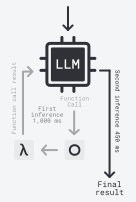
TTFT for inference that includes a function call. LLM TTFT is 450ms and throughput is 100 tokens per second. If the function call request chunk is 100 tokens, it takes 1s to output the function call request. Then we execute the function and run inference again. This time, we can stream the output, so after 450ms we have the first tokens we can use. TTFT for the full inference is 1,450ms (not including the time it takes to execute the function itself ).
You can either:
- Always output a message before executing the function call. "Please wait while I do X for you …"
- Set a watchdog timer, and output a message only if the function call loop hasn't completed before the timer fires. "Still working on this, please wait just another moment …"
Or both, of course. And you can play background music while executing long-running function calls.[36]
[36] Not the Jeopardy theme song though, please.
5.11.3 Handling interruptions
LLMs are trained to expect function call request messages and function call response messages as matched pairs.
This means that:
- You need to stop your voice-to-voice inference loop until all function calls complete. See below for notes on Asynchronous function calls.
- If a function call is interrupted and will never complete, you need to put a function call response message into the context that indicates … something.
The rule here is that if the LLM calls a function, you need to put a request/response pair of messages into the context.
- If you put a dangling function call request message into the context and then continue the multi-turn conversation, you are creating a context that diverges from how the LLM was trained. (Some APIs will not allow this.)
- If you don't put a request/response pair into the context at all, you are teaching the LLM (via in-context learning) not to call the function.[37] Again, the results are unpredictable and probably not what you want.
[37] See the paper, Language Models are Few-Shot Learners.
Pipecat helps you follow these context management rules by inserting a request/response message pair into the context whenever a function call is initiated. (Of course, you can override this behavior and manage function call context messages directly.)
Here's what the pattern looks like, for function calls that are configured in two different ways: run-to-completion and interruptible.
User:  Please look up the price of 1000 widgets.
LLM: Please wait while I look up the price for 1000 widgets.
function call request: { name: "price_lookup", args: { item: "widget", quantity: 1000 } }
function call response: { status: IN_PROGRESS }
Initial context messages. A function call request message and a function call response placeholder.
User:  Please look up the price of 1000 widgets.
function call request: { name: "price_lookup", args: { item: "widget", quantity: 1000 } }
function call response: { result: { price: 12.35 } }
Context when the function call completes.
User:  Please look up the price of 1000 widgets.
LLM: Please wait while I look up the price for 1000 widgets.
function call request: { name: "price_lookup", args: { item: "widget", quantity: 1000 } }
function call response: { status: IN_PROGRESS }

User: Please lookup the price of 1000 pre-assembled modules.
LLM: Please wait while I also look up the price for 1000 pre-assembled modules.
function call request: { name: "price_lookup", args: { item: "pre_assembled_module", quantity: 1000 } }
function call response: { status: IN_PROGRESS }
Placeholders allow the conversation to continue while function calls run, without "confusing" the LLM.
User:  "Please look up the price of 1000 widgets."
LLM: "Please wait while I look up the price for 1000 widgets."
function call request: { name: "price_lookup", args: { item: "widget", quantity: 1000 } }
function call response: { status: CANCELLED }

User: Please lookup the price of 1000 pre-assembled modules.
LLM: Please wait while I look up the price for 1000 pre-assembled modules.
function call request: { name: "price_lookup", args: { item: "pre_assembled_module", quantity: 1000 } }
function call response: { status: IN_PROGRESS }
If the function call is configured as interruptible, it will be canceled if the User speaks while the function call is in progress.
5.11.4 Streaming mode and function call chunks
In voice AI agent code, you almost always execute conversation inference calls in streaming mode. This gives you the first few content chunks as quickly as possible, which is important for voice-to-voice response latency.
Streaming mode and function calling make for an awkward pairing, though. Streaming isn't helpful for function call chunks. You can't call a function until you've assembled the LLM's complete function call request message.[38]
[38] If you’re using an AI framework, the framework probably hides this complexity from you.
Here's some feedback for inference providers as they continue to evolve their APIs: please offer a mode that delivers function call chunks atomically, and isolated from any streamed content chunks. This would significantly reduce the complexity of code that uses LLM provider APIs.
5.11.5 How and where to execute function calls
When the LLM emits a function call request, what do you do? Here are some commonly used patterns:
- Execute a function call with the same name as the requested function, directly in your code. This is what you see in almost every LLM function calling docs example.
- Map the request to an operation, based on arguments and context. Think of this as asking the LLM to do a generic function call, which you disambiguate in your code. The advantage of this pattern is that LLMs are usually better at function calling if you give them a small number of functions to choose between.[39]
- Proxy the function call to the client. This pattern is available to you in an application (not telephony) context. For example, imagine a get_location() function. You want the current location of the user's device, so you need to hook into the geo lookup API on that device.
- Proxy the function call to a network endpoint. This is often a particularly useful pattern in enterprise contexts. Define a set of functions that interact with internal APIs. Then create an abstraction in your code that executes these function calls as HTTP requests.
[39] Think of function call as a capacious category, here — function in the formal rather than colloquial sense. You can return a value from a lookup table. You can run a SQL query.
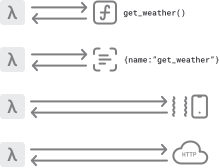
Function calling patterns
5.11.6 Asynchronous function calls
Sometimes you don't want to return from a function call right away. You know your function will take an unpredictably long time to complete. Maybe it won't complete at all. Maybe you even want to kick off a long-running process that can add to the context in an open-ended way over time.
Imagine a walking tour app that lets the user express interest in things they might see during the tour. "If we pass by any places where famous writers have lived, I'd particularly like to hear about those." One nice architecture for this would be for the LLM to call a function whenever a user expresses a specific interest. That function would start a background process, injecting information into the context when anything relevant to the interest is found.
You can't do this directly, today, using LLM function calling. Function call request/response messages have to appear together in the context.
So instead of defining a function with this shape:
register_interest_generator(interest: string) -> Iterator[Message]
You need to do something like this:
create_interest_task_and_return_success_immediately
  (interest: string, context_queue_callback: Callable[Message]) ->
    Literal["in_progress", "canceled", "success", "failure"]
For more discussion of this topic, see the Performing async inference tasks section, below.
As LLMs and APIs evolve to better support multimodal conversational use cases, we'd love to see LLM researchers explore ideas around asynchronous functions and long-running functions that act as generators.
5.11.7 Parallel and composite function calling
Parallel function calling means that the LLM can request multiple function calls in a single inference response. Composite function calling means that the LLM can flexibly call several functions in a row, chaining functions together to perform complex operations.
These are exciting capabilities!
But they also add to the variability of voice agent behavior. Which means you need to develop evals and monitoring that tests whether parallel and composite function calling is working as expected in real-world conversations.
Handling parallel function calling makes your agent code more complex. We often recommend that people disable parallel function calling unless there is a specific use for it.
Composite function calling feels like magic when it works well. One of our favorite early glimpses of composite function calling was seeing Claude Sonnet 3.5 chain together functions to load resources from files based on filename and timestamp.
User: Claude, load the most recent picture I have of the Eiffel Tower.
function call request: <list_files()>
function call response: <['eiffel_tower_1735838843.jpg', 'empire_state_building_1736374013.jpg', 'eiffel_tower_1737814100.jpg', 'eiffel_tower_1737609270.jpg',
'burj_khalifa_1737348929.jpg']
function call request: <load_resource('eiffel_tower_1737814100.jpg')>
function call response: <{ 'success': 'Image loaded successfully', 'image': … }>
LLM: I have loaded an image of the Eiffel Tower. The image shows the Eiffel
Tower on a cloudy day.
The LLM figures out how to chain two functions – list_files() and load_resource() – to respond to a specific instruction. The two functions are described in a tools list. But this chaining behavior is not prompted for.
Composite function calling is a relatively new capability of SOTA LLMs. Performance is "jagged" – surprisingly good, but frustratingly inconsistent.
5.12. Multimodality
LLMs now consume and produce audio, images, and video in addition to text.
We talked earlier about speech-to-speech models. These are models capable of taking audio as input and producing audio as output.
The multimodal capabilities of SOTA models are advancing rapidly.
GPT, Gemini, and Claude models all have very good vision capabilities – they all accept images as input. Vision support in these models started out focused on describing the image content and transcribing text that appears in images. Capabilities expand with each release. Counting objects, identifying bounding boxes, and better understanding of the relationship between objects in an image are all useful abilities that are available in newer releases.
Gemini Flash can do inference on video input, including understanding both video and audio tracks.[40]
One interesting new class of voice-enabled applications is the assistant that can "see" your screen and help perform tasks on your local machine or a web browser. A number of people have built scaffolding for voice driven web browsing.
Several programmers we know talk as much as they type, these days. It's fairly easy to wire up voice input to drive Claude Code[41] and Codex. It's also possible to wire up screen capture so your AI programming assistant can see exactly what you see – code in your editor, UI state of the web app you're building, a Python stacktrace in your terminal. This kind of fully multimodal AI programming assistant feels like another of the glimpses of the future we've talked about throughout this document.[42]
[40] You can process video with both GPT-4o and Claude by extracting individual frames from video and embedding those frames in the context as images. This approach has limitations, but works well for some "video" use cases.
[41] See the Pipecat MCP Server package — https://github.com/pipecat-ai/pipecat-mcp-server
[42] See swyx's talk at OpenAI Dev Day 2024 Singapore, "Engineering AI Agents".
Right now, all the SOTA models support multimodality in different combinations.
- GPT-4.1 has text and image input, and text output.
- gpt-realtime has text, audio, and image input, and text and audio output.
- Gemini Flash has text, audio, image, and video input, but only text output.
- OpenAI's speech-to-text and text-to-speech models are fully steerable and built on the gpt-4o foundation, but are specialized for converting between text and audio: gpt-4o-transcribe, gpt-4o-mini-transcribe, and gpt-4o-mini-tts.
Multimodal support is evolving rapidly, and we expect the above list to be out of date soon!
For voice AI, the biggest challenge with multimodality is that audio and images use a lot of tokens, and more tokens mean higher latency.
| Example media | Approximate token count |
|---|---|
| One minute of speech audio as text | 150 |
| One minute of speech audio as audio | 2,000 |
| One image | 250 |
| One minute of video | 15,000 |
For some applications, a big engineering challenge is achieving conversational latency while also handling large numbers of images. Conversational latency requires either keeping the context small or relying on vendor-specific caching APIs. Images add a lot of tokens to the context.
Imagine a personal assistant agent that runs all the time on your computer and watches your screen as part of its work loop. You might like to be able to ask, "I was about to read a tweet an hour ago when I got that phone call, and then I forgot about it and closed the tab. What was that tweet?"
An hour ago equates to almost a million tokens. Even if your model can accommodate a million tokens in its context[43], the cost and the latency of doing a multi-turn conversation with that many tokens every turn are prohibitive.
[43] Hello, Gemini!
You can summarize video as text, and keep only the summary in the context. You can calculate embeddings and do RAG-like lookup. LLMs are quite good at both feature summarization and using function calling to trigger complex RAG queries. But both of those approaches are complicated to engineer.
Ultimately, the biggest lever is context caching. All the SOTA API providers offer some support for caching. None of today's caching features are perfect, yet, for voice AI use cases. We expect caching APIs to improve this year, as multimodal, multi-turn conversation use cases get more attention from people training SOTA models.
6. Using multiple AI models
Today's production voice AI agents use multiple deep learning models in combination.[44]
As we've discussed, the typical voice AI processing loop transcribes the user's voice with a speech-to-text model, passes the transcribed text to an LLM to generate a response, then performs a text-to-speech step to generate the agent's voice output.
In addition, many production voice agents today use multiple models in complex and varied ways.
[44] Even the speech-to-speech APIs from OpenAI and Google use dedicated VAD and noise reduction models to implement turn detection.
6.1. Using several fine-tuned models
Most voice AI agents use a SOTA[45] model from OpenAI or Google (and sometimes Anthropic or Meta). Using the newest, best-performing models is important because voice AI workflows generally are right at the edge of the jagged frontier[46] of model capability. Voice agents need to be able to follow complex instructions, participate in open-ended conversations with people in a natural way, and use functions and tools reliably.
[45] SOTA — state of the art — is a widely used AI engineering term that loosely means "the newest large models from the leading AI labs."
But for some specialized use cases, it can make sense to fine-tune models for different states of a conversation. A fine-tuned model can be smaller, faster, and cheaper to run than a large model while still performing equally well (or better) on specific tasks.
Imagine an agent that assists with parts ordering from a very large industrial supply catalog. For this task, you might train several different models, each one focused on a different category: plastic materials, metal materials, fasteners, plumbing, electrical, safety equipment, etc.
[46] Wharton professor Ethan Mollick coined the term "jagged frontier" to describe the complex edge zone of SOTA model capability — sometimes astonishingly good, sometimes frustratingly bad.
Fine-tuned models can generally "learn" things in two important categories:
- Embedded knowledge — models can learn facts.
- Response patterns — models can learn to transform data in specific ways, which also includes learning conversational patterns and flows.
Our hypothetical industrial supply company has extensive raw data:
- A very large knowledge base consisting of data sheets, manufacturer recommendations, prices, and internal data about every part in the catalog.
- Text chat logs, email chains, and transcribed phone conversations with human support agents.
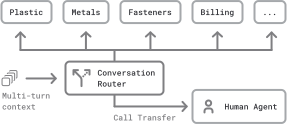
Using fine-tuned models for specific conversation topics. A variety of architectural approaches are possible. In this example, at the beginning of each conversation turn a router LLM classifies the full context.
Turning this raw data into data sets for fine-tuning models is a large job, but tractable. The required data cleaning, data set creation, model training, and model evaluation are all well-understood problems.
One important note: don't jump straight to fine-tuning — start with prompt engineering.
Prompting can almost always achieve the same task results as fine-tuning. The advantage of fine-tuning is the ability to use a smaller model, which can translate to faster inference and lower cost.[47]
With prompting, you can get started much more easily and iterate much more quickly than you can with fine-tuning.[48]
When initially exploring how to use different models for different conversation states, think of your prompts as miniature "models." You are teaching the LLM what to do by crafting a large, context-specific prompt.
- For embedded knowledge, implement a search capability that can pull information from your knowledge base and assemble search results into an effective prompt. For more on this, see the RAG and memory section, below.
- For response patterns, embed examples of how you expect the model to respond to different questions. Sometimes, just a few examples are enough. Sometimes, you will need lots of examples — 100 or more.
[47] If you're interested in digging deep into prompting vs fine-tuning, see these two classic papers: Language Models Are Few-shot Learners, and A Comprehensive Survey of Few-shot Learning.
[48] Follow the classic engineering advice: make it work, make it fast, make it cheap. Don't think about moving from prompt engineering to fine-tuning until somewhere in the middle of the make it fast part of the process. (If at all.)
6.2. Performing async inference tasks
Sometimes you want to use an LLM for a task that will take a relatively long time to run. Remember that in our core conversation loop we're aiming for response times of around a second (or less). If a task will take longer than a couple of seconds, you have two choices:
- Tell the user what's happening and ask them to wait. Please hold on while I look that up for you …"
- Perform the longer task asynchronously, allowing the conversation to continue while it's happening in the background. "I'll look that up for you. While I do that, do you have any other questions?"
If you're performing an inference task asynchronously, you might choose to use a different LLM for that specific task. (Since it's decoupled from the core conversation loop.) You might use an LLM that is slower than would be acceptable for voice responses, or an LLM you have fine-tuned for a specific task.
A few examples of async inference tasks:
- Implementing content "guardrails". (See the Content guardrails section.)
- Creating an image.
- Generating code to run in a sandbox.
The amazing progress last year in reasoning models expands what we can ask LLMs to do. You can't use these models for a voice AI conversation loop, though, because they will often spend significant time producing thinking tokens before they emit usable output. Using reasoning models as async parts of a multi-model voice AI architecture can work well, though.
Async inference is usually triggered by an LLM function call. A simple approach is to define two functions.
perform_async_inference()— This is called by the LLM when it decides that any long-running inference task should run. You can define more than one of these. Note that you need to start the async task and then immediately return a basic started task successfully response, so that the function call request and response messages are correctly ordered in the context.[50]queue_async_context_insertion()— This is called by your orchestration layer when your async inference finishes. The tricky thing here is that how you insert results into the context will depend on what you're trying to do, and on what the LLM/API you are using allows. One approach is to wait until the end of any in-progress conversation turn (including the completion of all function calls), put the async inference results into a specially crafted user message, and then run another conversation turn.
[50] See Asynchronouns function calls.
6.3. Content guardrails
Voice AI agents have several vulnerabilities that cause major issues for some use cases.
- Prompt injection
- Hallucination
- Out-of-date knowledge
- Production of inappropriate or unsafe content
Content guardrails is a general term for code that tries to detect any of these — protecting the LLM from both accidental and malicious prompt injection; catching bad LLM output before it is sent to users.
Using a specific model (or models) for guardrails has a couple of potential advantages:
- Small models can be a good fit for guardrails and safety monitoring. Identifying problematic content can be a relatively specialized task. (In fact, for prompt injection mitigation specifically, you don't necessarily want a model that can be prompted in a fully general way.)
- Using a different model for guardrail work has the advantage that it won't have exactly the same weaknesses as your main model. At least in theory.
Several open source agent frameworks have guardrails components.
- llama-guard is part of Meta's llama-stack
- NeMO Guardrails is an open-source toolkit for adding programmable guardrails to LLM-based conversational applications
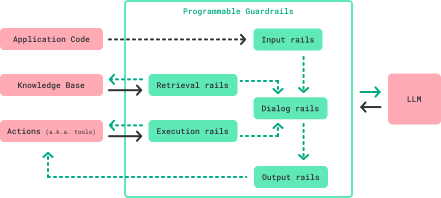
Five types of guardrails supported by NVIDIA's NeMo Guardrails framework. Diagram from NeMo Guardrails documentation.
Both of these frameworks were designed with text chat in mind, not voice AI. But both have useful ideas and abstractions and are worth looking at if you are thinking about guardrails, safety, and content moderation.
It's worth noting that LLMs are much, much better at avoiding all of these issues than they were a year ago.
Hallucination in general is not a major issue any more with the newest models from the large labs. We only see two categories of hallucination regularly, these days.
- The LLM "pretending" to call a function, but not actually doing so. This is fixable through prompting. You need good evals to be sure there aren't cases where this happens with your prompts. When you see function call hallucination in your evals, iterate on your prompt until you don't see it any more. (Remember that multi-turn conversations really stress LLM function calling abilities, so your evals need to mirror your real-world, multi-turn conversations.)
- The LLM hallucinating when you expect it to do a web search. Built-in search grounding is a relatively new feature of LLM APIs. It's a little bit unpredictable, still, whether LLMs will choose to perform a search. If they don't search, they may respond with (older) knowledge embedded in their weights, or a hallucination. Unlike function call hallucination, this is not particularly easy to fix with prompting. But it is easy to know whether a search was actually performed. So you can display that information in an application UI or inject it into the voice conversation. If your app relies on web search, doing this is a good idea. You're pushing the problem to the user to understand and deal with, but that's better than hiding the "searched" or "didn't search" distinction from the user. On the positive side, when search grounding does work, it can largely eliminate out-of-date knowledge issues.
All of the APIs from the major labs have very good content safety filters.
Prompt injection mitigation is also much better than it was a year ago, but the surface area of potential prompt injection attacks expands as LLMs gain new capabilities. For example, prompt injection from text in images is now an issue.
As a very, very general guideline: today in voice AI use cases you are unlikely to see occurrences of accidental prompt injection caused by normal user behavior. But it is definitely possible to steer LLM behavior in ways that subvert system instructions, solely through user input. It's important to test your agents with this in mind. In particular, it's very important to sanitize and cross-check LLM-generated input to any functions that access backend systems.
6.4. Performing single inference actions
For AI engineers, learning how to leverage LLMs is an ongoing process. Part of that process is a mental shift in how we think about these new tools. When we first started using LLMs, most of us thought about them through the lens, what are language models uniquely capable of? But LLMs are general-purpose tools. They are good at a very broad range of information processing tasks.
In a voice agent context, we always have a code path set up to perform LLM inference. We don't need to limit ourselves to using the LLM only for the core conversation loop.
For example:
- Any time you reach for a regular expression, you can probably write a prompt instead.
- Post-processing LLM output is often useful. For example, you might want to generate output in two formats: text for display in a UI and voice for the interactive conversation. You can prompt the conversation LLM to generate nicely formatted markdown text, then prompt the LLM again to shorten and reformat the text for voice generation.[51]
- Recursion is powerful.[52] You can do things like have an LLM generate a list, and then call the LLM again to perform operations on each element of the list.
- It turns out that you often want to summarize multi-turn conversations. LLMs are fantastic, steerable, summarizers. More on this in the Scripting and instruction following section, below.
[51] See also the Content guardrails section, above, regarding post-processing LLM output.
[52] We're programmers, of course we … — ed.
Many of these emerging code patterns look like a language model using either itself, or another language model, as a tool.
This is such a powerful idea that we expect to see lots of people work on this in 2026. Agent frameworks can build support for this into their library-level APIs. Models can be trained to perform inference recursively in a way roughly analogous to training them to call functions and perform code execution.
6.5. Towards self-improving systems
When we access a SOTA "model" via an API, we are not accessing a single artifact. The systems behind the APIs use various routing, multi-stage processing, and distributed systems techniques to perform inference fast, flexibly, reliably, and at extraordinary scale. These systems are always being tweaked. Weights are updated. Low-level inference implementations get more efficient all the time. Systems architectures evolve.
The big labs are continually shortening the feedback loop between how users use their APIs and how they implement inference and other capabilities.
These ever-faster feedback loops are a big part of the amazing macro-level AI progress happening these days.
Taking inspiration from this, what could micro-level feedback loops in our agent-level code look like? Can we build specific scaffolding that improves agent performance during a conversation?
- Monitor how often the agent interrupts the user before they are finished talking, and dynamically adjust parameters like VAD timeouts.
- Monitor how often the user interrupts the agent and dynamically adjust LLM response length.
- Look for patterns that indicate a user is having trouble understanding the conversation — maybe the user is not a native speaker. Adjust the conversation style or offer to switch languages.
Can you think of other ideas?
User: How has MNI performed recently?
Agent: The Miami Dolphins won their game yesterday 21
to 3 and now lead the AFC East with two games remain-
 ing in the regular season.
User: No, I meant the stock MNI.
Agent: Ah, my apologies! You're asking about the
stock performance of MNI, which is the ticker symbol
 for McClatchy Company …
 From this point on, the model will bias towards
interpreting phonemes or transcribed text as "MNI"
 rather than "Miami".
An example of an LLM adjusting behavior based on user feedback during a multi-turn session (in-context learning)
7. Scripting and instruction following
A year ago, just being able to build voice agents capable of open-ended conversations at natural human latency was exciting.
Now we're deploying voice AI agents to do complicated, real-world tasks. For today's use cases, we need to instruct the LLM to focus on specific goals during a session. Often, we need the LLM to perform sub-tasks in a specific order.
For example, in a healthcare patient intake workflow, we want the agent to:
- Verify the patient's identity before doing anything else.
- Make sure to ask what medications the patient is currently taking.
- If the patient says they are taking medicine X, ask a particular follow-up question.
- Etc …
We refer to crafting step-by-step workflows as scripting. One lesson from the last year of voice AI development is that it's hard to achieve scripting reliability with prompt engineering alone.
There's only so much detail that can be packed into a single prompt. Relatedly, as the context grows in a multi-turn conversation, the LLM has more and more information to keep track of, and instruction following accuracy declines.
Many voice AI developers are moving towards a state machine approach to building complex workflows. Instead of writing a long, detailed system instruction to guide the LLM, we can define a series of states. Each state is:
- A system instruction and tools list.
- A conversation context.
- One or more exits from the current state to another state.
Each state transition is an opportunity to:
- Update the system instruction and tools list.
- Summarize or modify the context.[53]
[53] Usually, you make an LLM inference call to perform context summarization. :-)
The state machine approach works well because shorter, more focused system instructions, tools lists, and contexts significantly improve LLM instruction following.
The challenge is to find the right balance between, on the one hand, leveraging the LLM's ability to have an open-ended, natural conversation, and on the other, making sure the LLM reliably executes the important parts of the job to be done.
Pipecat Flows is a library built on top of Pipecat that helps developers create workflow state machines.
The state diagram is represented as JSON and can be loaded into a Pipecat process. There's a graphical editor for creating these JSON state diagrams.
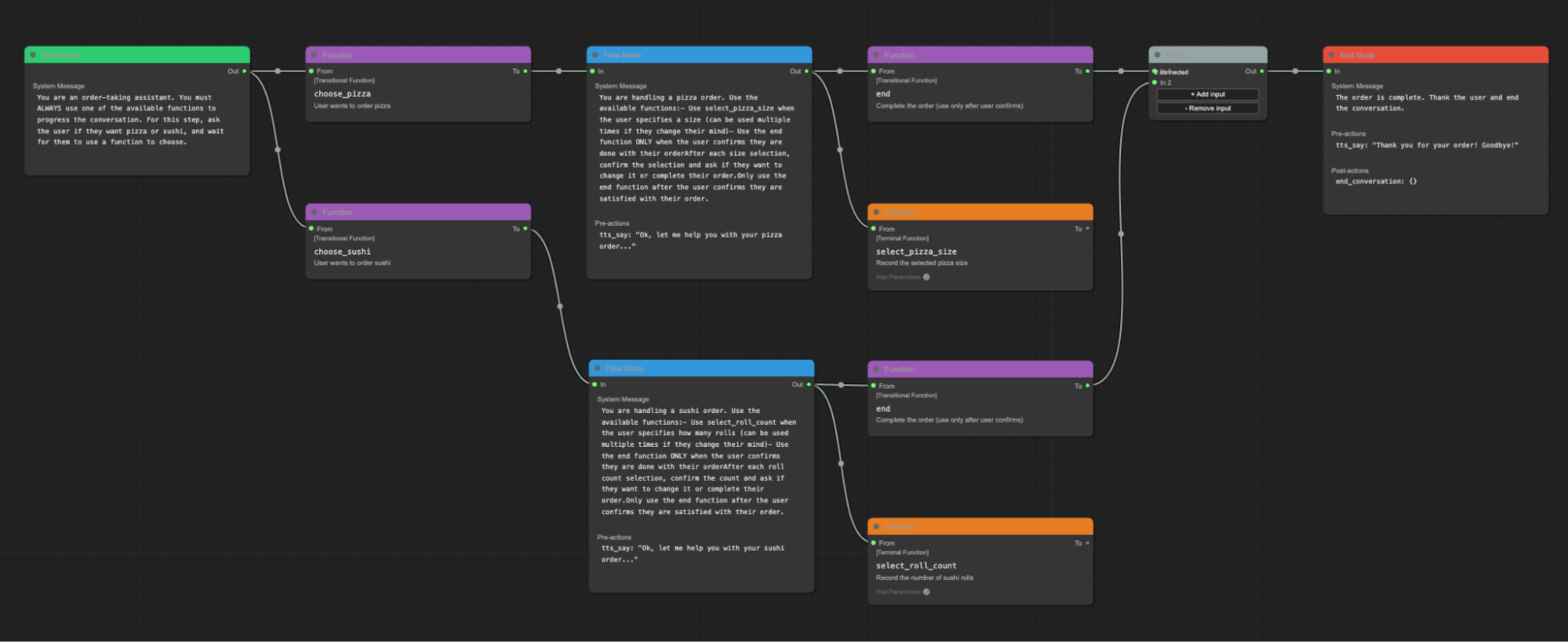
Pipecat Flows graphical editor
Pipecat Flows and state machines are seeing a lot of developer adoption right now. But there are other interesting ways to think about building abstractions for complex workflows.
One active area of AI research and development is multi-agent systems. You could think of a workflow as a multi-agent system, instead of as a series of states to traverse.
One of Pipecat's core architectural components is the parallel pipeline. A parallel pipeline allows you to split the data going through the processing graph and operate on it twice (or more). You can block and filter data. You can define many parallel pipelines. You could think of a workflow as a set of gated, coordinated parallel pipelines.
The rapid evolution of voice AI tooling is exciting, and highlights how early we are in figuring out the best way to build these new kinds of programs.
8. Voice AI Evals
One very important type of tooling is the eval, short for evaluation.
Eval is a machine learning term for a tool or process that assesses the capabilities of a system and judges its quality.
8.1. Voice AI evals are different from software unit tests
If you're coming from a traditional software engineering background, you're used to thinking about testing as a (mostly) deterministic exercise.
Voice AI requires tests that are different from traditional software engineering. Voice AI outputs are non-deterministic. The inputs for testing voice AI are complex, branching, multi-turn conversations.
Instead of testing that a specific input produces a specific output (f(x) = y), you will need to run probabilistic evals – lots of test runs to see how often a certain type of event happens.[54] For some tests, getting a class of cases right 8/10 times is acceptable, for others accuracy needs to be 9.99/10.
[54] The user request was fulfilled, the agent interrupted the user, the agent went off topic, etc
Instead of just having one input, you will have many: all of the user responses. This makes it very hard to test voice AI applications without attempting to simulate user behavior.
Finally, voice AI tests have non-binary results and will rarely yield a definitive ✅ or ❌ like traditional unit tests do. Instead, you will need to review results and decide on tradeoffs.
8.2. Failure modes
Voice AI apps are challenging to test, eval, and monitor. Voice agents are multi-model and multi-modal. Latency is critical.
Some areas that frequently present challenges today are:
- Latency of time-to-first-speech and time-to-agent-response.
- Transcription errors.
- Understanding and verbalizing addresses, emails, names, phone numbers.
- Interruptions.
8.3. Crafting an eval strategy
A rudimentary eval process can be as simple as a spreadsheet with prompts and test cases.
One typical approach is to run each prompt whenever you test a new model or change a major part of your system, using an LLM to judge whether the responses fall within some definition of expected parameters.
Pipecat includes core functionality to support building your own evals. The intended use case is "closing the loop" so that coding agents can iteratively test agents during development.
Having a basic eval is much better than not having any evals at all. But investing in evals – having really good evals – becomes critical as you start to operate at scale.
Evaluation platforms that offer sophisticated tooling for voice AI use cases are just beginning to emerge. Several platforms that are leading the way in developing tools for audio evals, testing, simulation, and monitoring are Cekura, Coval, and Bluejay. All three have excellent Pipecat integrations.
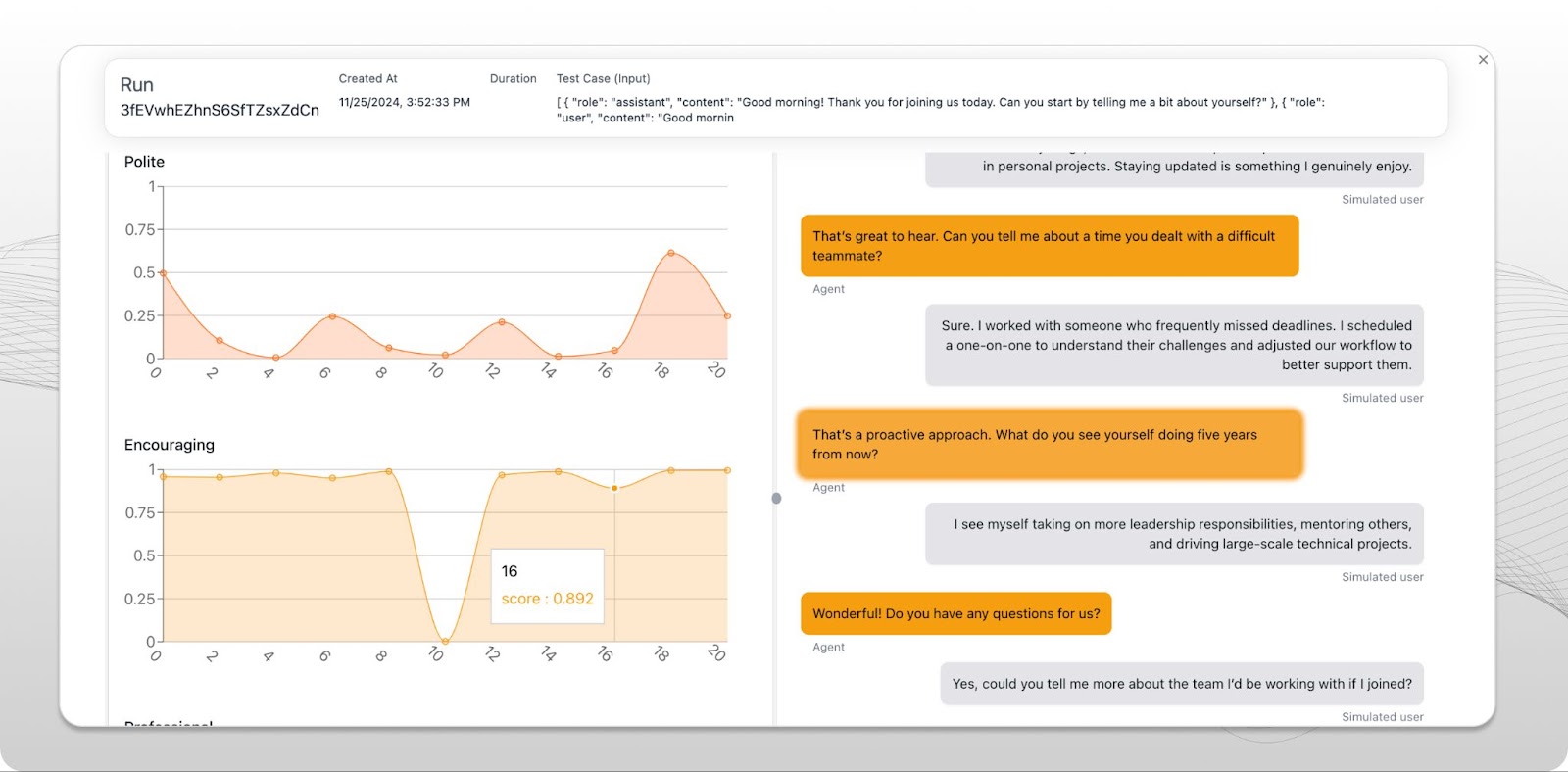
A screenshot from the Coval evals platform UI
These platforms can help with:
- Prompt iteration.
- Off-the-shelf metrics for audio, workflow, function calling, and semantic evaluation of conversations.
- Hillclimbing on problem areas (for example, making your agents better at handling interruptions).
- Regression testing (to be sure when you fix one problem area you don't introduce regressions in other previously solved problem areas).
- Tracking performance changes over time, both as changes are made by developers, and across user cohorts.
9. Integrating with telephony infrastructure
Most of the fastest growing voice AI use cases today involve telephone calls. AI voice agents are answering phone calls and making phone calls at scale today.
Some of this is happening in traditional call centers. Call centers mostly view voice AI as a technology that can improve "deflection rates" – the percentage of calls that can be handled by automation rather than human agents. This makes the ROI for adopting voice AI clear. If the per-minute cost of an LLM is cheaper than the per-minute cost of a human agent, the buying decision is easy.[55]
[55] Assuming, of course, that AI agent performance is good. Which, for a wide variety of customer support use cases today, it is.
A couple of interesting things are happening that accelerate adoption, though, beyond simple ROI calculations.
Voice AI agents are scalable in ways that a human staff isn't. Once you have voice AI in place, wait times during high-volume periods go down. (Customer satisfaction scores go up, as a direct result.)
And LLMs can sometimes do a better job than human agents because we're giving them better tools. In many customer support situations, human agents have to deal with multiple legacy backend systems. Finding information in a timely fashion can be a challenge. When we deploy voice AI into that same situation, we have to build API-level access to these legacy systems. New LLM-plus-API layers are enabling the technology transition to voice AI.
It's clear that generative AI is going to completely reshape the call center landscape over the next few years.
Outside the call center, voice AI is changing how small businesses field phone calls, and how they use phone calls for information discovery and coordination. We talk every day to startups building specialized AI telephony solutions for every business vertical that you've ever heard of.
People in this space often joke that pretty soon humans won't make, or receive, phone calls at all. The phone calls will all be AI-to-AI. Judging from the trendlines we see, there's some truth to this!
If you're interested in telephony for voice AI, there are a few acronyms and common ideas you should be familiar with.
- PSTN is the public, switched, telephone network. If you need to interact with a real phone that has a phone number, you'll need to work with a PSTN platform. Twilio is a PSTN platform that almost every developer has heard of.
- SIP is a specific protocol used for IP telephony, but in a general sense SIP is used to refer to telephone interconnects between systems. If you're interfacing with a call center tech stack, for example, you'll need to use SIP. You can work with a SIP provider, or host your own SIP servers.
- DTMF tones are the keypress sounds used to navigate telephone menus. Voice agents need to be able to send DTMF tones to interact with real-world telephone systems. LLMs are pretty good at dealing with phone trees. You just need to do a little bit of prompt engineering and define functions that send DTMF tones.
- Voice agents often need to execute call transfers. In a simple transfer, the voice AI exits the session by calling a function that triggers a call transfer.[56] A warm transfer is a hand-off from one agent to another, in which the agents talk to each other before transferring the caller to the second agent. Voice AI agents can do warm transfers, just like humans can. The voice agent starts out talking to the human caller, then puts the human caller on hold and has a conversation with the new human agent being brought into the call, then connects the human caller to the human agent.
[56] The actual transfer operation might be an API call to your telephony platform, or a SIP REFER action.
10. RAG and memory
Voice AI agents often access information from external systems. For example, you might need to:
- Incorporate information about the user into the LLM system instructions.
- Retrieve previous conversation history.
- Look up information in a knowledge base.
- Perform a web search.
- Do a realtime inventory or order status check.
All of these fall under the category of RAG – retrieval augmented generation. RAG is the general AI engineering term for combining information retrieval and LLM prompting.
The "simplest possible RAG" for a voice agent is looking up information about a user before the conversation starts, then merging that information into the LLM system instructions.
user_info = fetch_user_info(user_id)

system_prompt_base = "You are a voice AI assistant..."

system_prompt = (
  system_prompt_base
  + f"""
The name of the patient is {user_info["name"]}.
The patient is {user_info["age"]} years old.
The patient has the following medical history: {user_info["summarized_history"]}.
"""
)
Simple RAG – perform a lookup at the beginning of the session
RAG is a deep topic and an area of rapid change.[57] Techniques range from the relatively simple approach above that just uses basic lookups and string interpolation, to systems that organize very large amounts of semi-structured data using embeddings and vector databases.
[57] Hmm. This sounds like every other area of generative AI, these days.
Often, an 80/20 approach gets you a very long way. If you have an existing knowledge base, use the APIs you already have. Write simple evals so you can test a few different formats for injecting lookup results into the conversation context. Deploy to production, then monitor how well this works with real-world users.
async def query_order_system(function_name, tool_call_id, args, llm, context, result_callback):
  "First push a speech frame. This is handy when the LLM response might take a while."
  await llm.push_frame(TTSSpeakFrame("Please hold on while I look that order up for you."))

  query_result = order_system.get(args["query"])
  await result_callback({
    "info": json.dumps({
     "lookup_success": True,
     "order_status": query_result["order_status"],
     "delivery_date": query_result["delivery_date"],
    })
 })

llm.register_function("query_order_system", query_order_system)
RAG during a session. Define a function for the LLM to call when information lookup is required. In this example, we also emit a pre-set spoken phrase to let the user know the system will take a few seconds to respond.
As always, latency is a bigger challenge with voice AI than for non-voice AI systems. When an LLM makes a function call request, the extra inference call adds to latency. Looking up information in external systems can be slow, too. It's often useful to trigger a simple speech output before executing the RAG lookup, to let the user know that work is in progress.
More broadly, memory across sessions is a useful capability. Imagine a voice AI personal assistant that needs to remember everything you talk about. Two general approaches are:
- Save each conversation to persistent storage. Test a few approaches to loading conversations into the context. For example, a strategy that works well for the personal assistant use case: always load the most recent conversation in full at agent startup, load summaries of the most recent N conversations, and define a lookup function the LLM can use to load older conversations dynamically as needed.
- Save each message in the conversation history separately in a database, along with metadata about the message graph. Index every message (perhaps using semantic embeddings). This allows you to build branching conversation histories dynamically. You might want to do this if your app makes heavy use of image input (LLM vision). Images take up a lot of context space![58] This approach also allows you to build branching UIs, which is a direction that AI app designers are just starting to explore.
[58] See Multimodality.
11. Hosting and scaling
Voice AI applications often have some traditional application components — web app frontends, API endpoints and other back-end elements. But the agent process itself is different enough from traditional app components that deploying and scaling voice AI comes with unique challenges.
11.1. Architecture
- The voice AI agent conversation loop is usually a long-running process (not a request/response function that exits when a single response is finished generating).
- Voice agents stream audio in realtime. Anything that stalls streaming can create audio glitches. (CPU spikes on a shared virtual machine, program flow that blocks audio thread execution even for as little as 10ms, etc.)
- Voice agents usually need either WebSocket or WebRTC connectivity. Cloud service network gateway and routing products don’t support WebSockets nearly as well as they support HTTP. They often don’t support UDP at all. (UDP is required for WebRTC.)
For all of these reasons, it’s generally not possible to use a serverless framework like AWS Lambda or Google Cloud Run for voice AI.
The best practice today for deploying voice AI agents is:
- Once you’ve gotten past the prototyping phase, invest engineering time in creating lightweight tooling to build Docker (or similar) containers to deploy your agents.
- Push your container to your compute platform of choice. For simple deployments, you can just keep a fixed number of virtual machines running. At some point, though, you’ll want to hook into your platform’s tooling so you can autoscale, deploy new versions gracefully, implement good service discovery and failover, and build other at-scale devops requirements.
- Kubernetes is the standard these days for managing containers, deployments, and scaling. Kubernetes has a steep learning curve, but is supported on all of the major cloud platforms. Kubernetes has a very large ecosystem around it.
- For deploying software updates, you’ll want to set long drain times that allow existing connections to stay alive until sessions end. This is not terribly hard to do in Kubernetes, but the details depend on your k8s engine and version.
- Cold starts are a problem for voice AI agents, because fast connection times are important. Keeping an idle pool of agents is the easiest way to avoid long cold starts. If your workloads don’t require running large models locally, you can generally engineer fast container cold starts without too much effort.[59]
Virtual machine specs and container packing often trip people up when deploying to production for the first time. The specs your agents need will vary depending on what libraries you use and how much CPU-intensive work you do within your agent process. A good rule of thumb is to start by running a single agent per virtual machine CPU, with double the maximum amount of RAM you see an agent process consuming on your dev machines.[60]
Daily's Pipecat Cloud agent hosting platform manages all of the Kubernetes pain points for you. You can "docker push" your Pipecat agents to Pipecat Cloud and run them at scale, in multiple global regions, with native telephony and WebRTC network support.
[59] If you are running large models locally, advice about cold starts is well outside the scope of this guide. If you’re not already an expert on GPU and container optimization, you probably want to find an expert, rather than climb up that learning curve yourself (at least until you’re operating at a big enough scale to amortize the cost of developing the tooling you need).
[60] Make sure your container runtime is starting new agent processes on idle CPUs. This is not always the k8s default.
11.2. Calculating per-minute cost
Voice AI cost varies widely depending on what models, APIs, and hosting infrastructure are used. Cost also depends on use case. For example, as discussed in cost comparison above, per-minute costs are generally higher for longer sessions. And telephony is more expensive than WebRTC transport.
Costs range from $0.20 per minute or more if you are using a speech-to-speech API like the OpenAI Realtime API, to $0.10 per minute for batteries-included hosted agent platforms, down to $0.02 per minute for highly cost-optimized deployments running at significant scale.
One mistake we sometimes see people make is cost-optimizing the agent hosting itself, before calculating the cost of the speech and LLM APIs. In general, cloud runtime costs for the agent processes themselves are less than one percent of total per-minute cost. It is almost never worth spending engineering effort on optimizing per-vCPU agent concurrency.
Here is a spreadsheet that you can copy and use as a starting point for calculating per-minute cost.
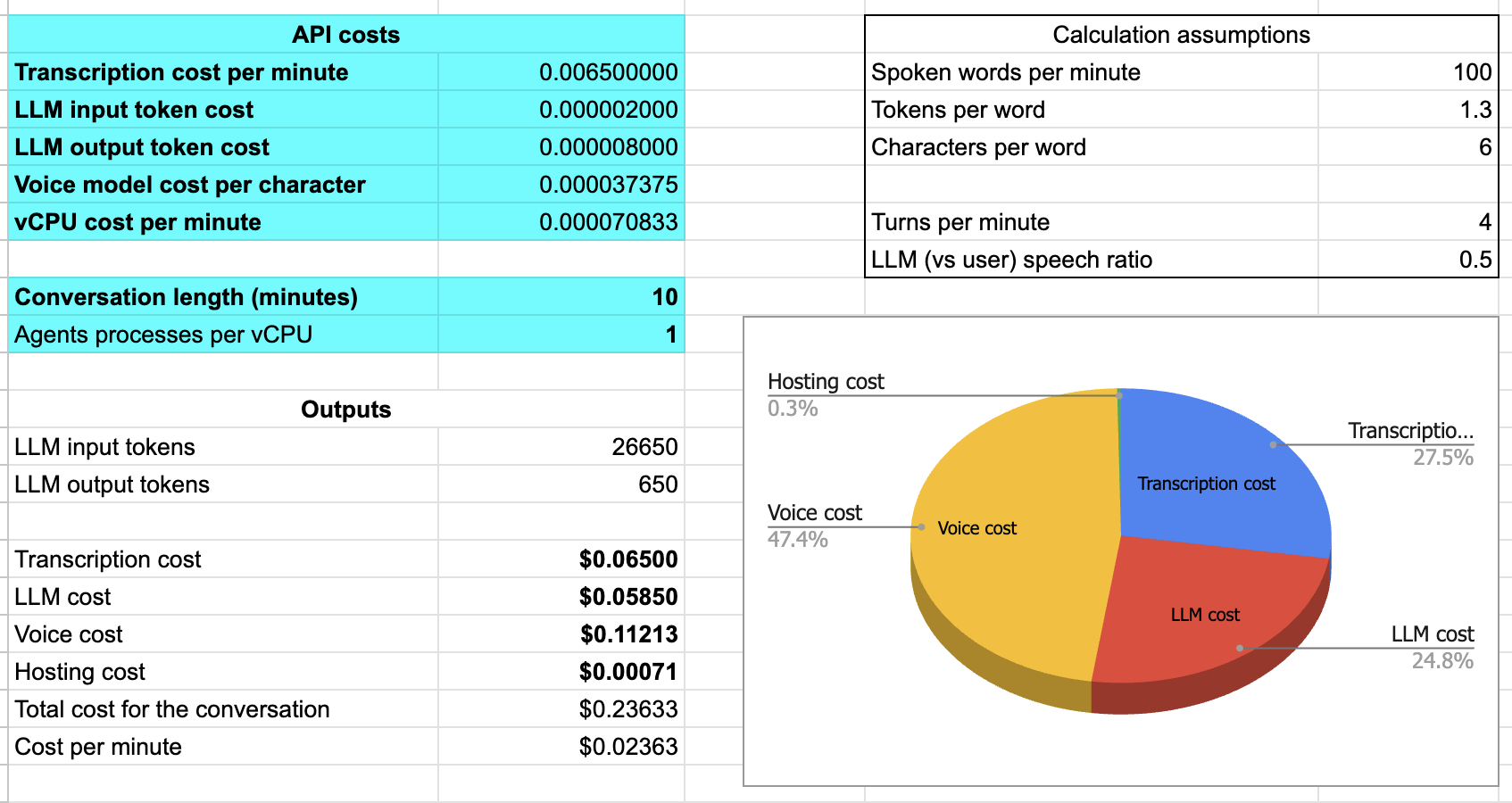
A spreadsheet to calculate per-minute costs for voice AI agents
The numbers in the screenshot are for a self-hosted agent that uses Deepgram, GPT-4o, and Cartesia. For a ten-minute session, the per-minute cost is about two and a half cents. Transcription and the LLM inference are each about a quarter of the cost. Voice generation is about half of the cost. Hosting is less than one percent of the cost.
Of course, this is not a realistic picture of what self-hosting actually costs. If you are building and maintaining all of your own hosting infrastructure, you'll need to set up, scale, and maintain a number of systems and capabilities in addition to the agents themselves.
- Service discovery
- Load balancing
- Logging
- Monitoring
- Bandwidth
- Multiple regions
- Security
- Compliance and regulatory features (data residency, for example)
- Analytics
- Customer support
12. What's coming in 2026 and 2027
Voice agents are deployed at scale today in call centers and other enterprise use cases. But we are only just beginning to scratch the surface of broader Voice AI possibilities.
Some of the topics we’re most excited about, in 2026, include:
New programming abstractions for using subagents, multiple models, and multiple inference loops in a single "agent." Increasingly, production voice agents use a model for the voice conversation pipeline, and also start, stop, and steer subagents for specialized processing and long-running, agentic sub-processes.
Robotics and physical AI devices with voice interfaces are a big area of development. See, for example, the NVIDIA ACE Controller library.
Today’s AI-native applications are fundamentally multi-modal: both voice and text for input and output; image input from the camera and so the agent can see what’s on your screen; and dynamic user interfaces that are partially generated by an LLM in real time.
And perhaps the biggest picture trend is that everything is moving towards natural language and continual learning. Large Language Models are such powerful language processing engines: we’re learning how to specify everything in natural language, how to make these "natural language systems" composable, and how to build loops that automatically improve our agents.
The open source Reachy Mini robot had voice interface sample code (and Pipecat support) on launch day! https://huggingface.co/blog/reachy-mini
Contributors
Lead Author
Kwindla Hultman Kramer
Thanks to CKK for editorial support.
Contributing Authors[61]
aconchillo, markbackman, kompfner, filipi87, Moishe, vipyne, gkmngrgn, Vaibhav159, chadbailey59, getchannel, mattieruth, jptaylor, marcus-daily, sam-s10s, omChauhanDev, padillamt, Allenmylath, gokuljs, ivaaan, jamsea, dhruvladia-sarvam, zkleb-aai, lukepayyapilli, eRuaro, shreyas-sarvam, matejmarinko-soniox, asilvestre, m-ods, DominicStewart, TomTom101, golbin, adriancowham, yousifa, imsakg, mikeseese, ianbbqzy, thsunkid, vr000m, LewisWolfgang, adithyaxx, richtermb, ssillerom, MaCaki, realgarik, kollaikal-rupesh, geereddysath, joachimchauvet, gui217, Antonyesk601, LaurentMazare, sahilsuman933, harshitajain165, adnansiddiquei, iCorv, sharvil, toni-pad, yuki901, scttbnsn, bnovik0v, cshape, dakshdua, itsderek23, deshraj, marcklingen, OmerCohenAviv, balalofernandez, jhpiedrahitao, TheCodingLand, RuiDaniel, wg-daniel, hankehly, nbyers-altira, jessieweiyi, milo157, dan-ince-aai, hwuiwon, kylegani, AngeloGiacco, nicougou, RJSkorski, fbarril, YFortin, roshie548, mihafabcic-soniox, mdepinet, aristid, jp-lemon, jqueguiner, Dev-Khant, timofey-TK, Stoic-Angel, fatwang2, roey-p, jaydamani, EyrisCrafts, Designedforusers, rjp44, Rickaym, philipp-eisen, lazeratops, kunal-cai, carolin-tavus, okue, Anrahya, thorwebdev, zgreathouse, aashsach, smokyabdulrahman, eoinoreilly30, Toprak2, ankykong, cbrianhill, brunomartinez-lmi, trycatchal, jjmaldonis, jcbjoe, joyceerhl, lukehalley, Maurotb, ajmeraharsh, sathwikareddy02, varunps2003, tanmayc25, koriyoshi2041, immuhammadfurqan, flixoflax, eecczz, denxxs, dbtreasure, DANIIL0579, Copilot, zeuslawyer, adenta, zytegalaxy, namanbansal013, nulyang, poseneror, sysradium, kstonekuan, kingster, mayurdd, radhikagpt1208, sunahsuh, TheNotary, a6kme, alexzhou-autoark, counterleft, CarlKho-Minerva, ahoshaiyan, dlange-aai, glennpow, snova-jorgep, julienvantyghem, ken-kuro, yohan-altrium, ydlamba, tomoima525, sklinglernv, rahultayal22, poislagarde, pelguetat, niczy, wollerman, manishkjs1, lucasrothman, zzz-heygen, zboyles, he-yufeng, alpsencer, yashn35, weakcamel, vpalmisano, phamtrung0633, vvbohdan, thibaudbrg, geluso, alts, soof-golan, simopot, shreygupta2809, shaiyon, sassanh, xtreme-sameer-vohra, RonakAgarwalVani, monster-anshu, wtlow003, weedge, porcelaincode, srhinos, shahrukhx01, rajneeshksoni, rahulunair, pratham-sarvam, parshvadaftari, otaqwawi, nikp06, mercuryyy, marctorsoc, makosst, lshaun, kaikato, joycech333, joshwhiton, iamjr15, ezun-kim, eddieoz, dyi1, balaji-buildx, alexflorensa, achalringg, gregschwartz, haayhappen, ecdeng, ezisezis, DanteNoguez, dleybz, wirjo, danthegoodman1, DamienDeepgram, cyrilS-dev, Regaddi, chhao01, Bnowako, BismeetSingh, azain47, anteverse, ArmanJR, Arindam200, Angad-2002, amichyrpi, Alex-yang00, surapuramakhil, adidoit, kedar389, Pulkit0729, pedro-a-n-moreira, pvilchez, stemper-dev, prettyprettyprettygood, nischalj10, nimobeeren, natestraub, Mudit-Arora, Mrunmay8558, MoofSoup, MHamdyK, mattmatters, martinxsliu, marcelodiaz558, M1ngXU, LucasStringPay, louisjoecodes, kcui5, KevGTL, wuodar, narra1211, jaideep329
Design
Sascha Mombartz
[61] GitHub usernames, github.com/pipecat-ai/pipecat/graphs/contributors